cancel
Showing results for 
Search instead for 
Did you mean: 

The Power BI Data Visualization World Championships is back! Get ahead of the game and start preparing now! Learn more

Reply
iraf
Frequent Visitor

Formatting Column and Data

In a data file that I have brought into powerbi, one particular column/field is 98% made up of 5 or 6 numbers, and the balance is made up of a combination of numbers and letters, like this - DS2-1328-000002.


I then tried to create a relationship between two files, using the same field as the common denominator, and I get an error message. I tried to format the column so both numbers and the number / letter combination are shown properly, but i cant seem to figure that out.


Any ideas ?

6 REPLIES 6
v-qiuyu-msft
Community Support
Community Support

Hi @iraf,


According to your description, one table contained a particular field which had numbers, and combination of numbers and letters (DS2-1328-000002). When you used the same field on two tables to build relationship, there was a error throws out, right?


In your scenario, this particular field should be Text data type. Does the same field mean this particular column? If that is a case, the same field in other table needs to be Text also mentioned by @CahabaData. If not, how about other fields? Can you share the detail error message and some screenshots about data tables for our analysis?


By the way, to create relationship, you can take a look at this article: Create and manage relationships in Power BI Desktop. About changing data type for a column, see: Data types in Power BI Desktop.


Best Regards,
Qiuyun Yu


Community Support Team _ Qiuyun Yu
If this post helps, then please consider Accept it as the solution to help the other members find it more quickly.

Thank you for both responses.


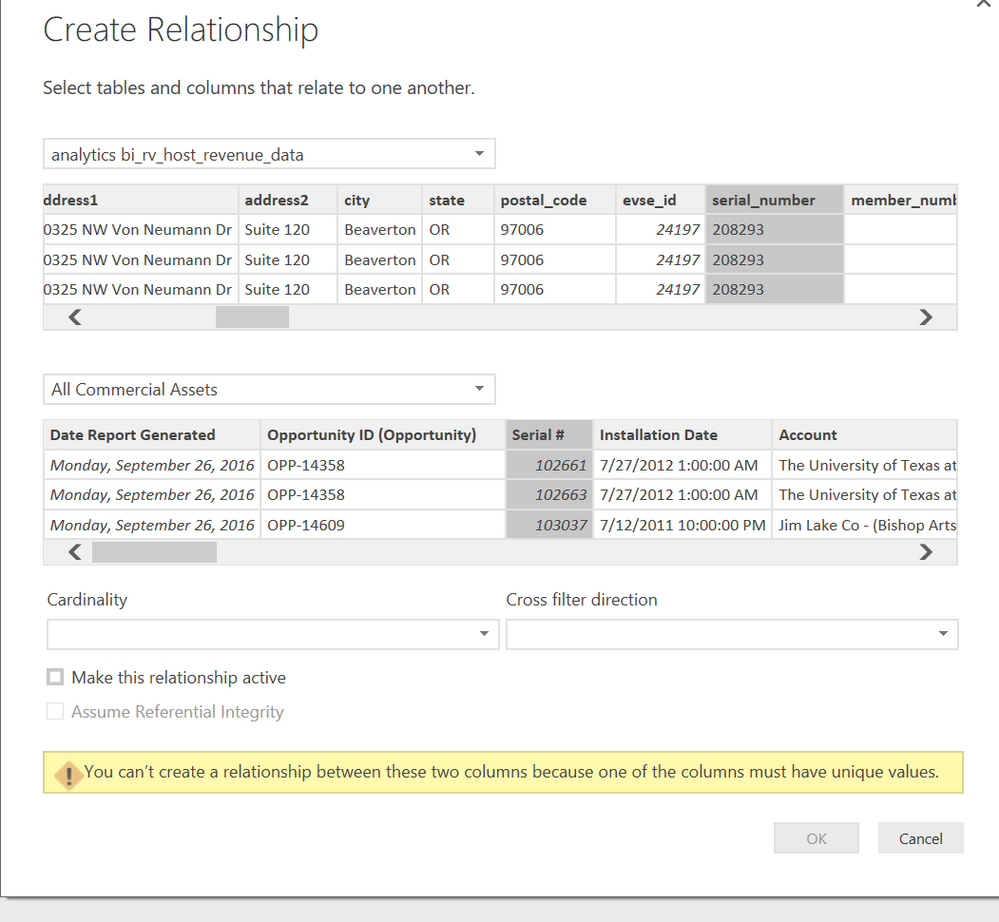
So I followed both steps to make sure that both columns are in text data format. Wen I tried to create the relationship again, I got an error message referencing unique values. I have no idea what that menas at this point, and do not know how to resolve. I have attached a screenshot of that error message.


Thank you again.


10.6.16.Relationship screen shot.PNG

if in both of your two tables the values do repeat - then you need to create a reference table.  Then you join both tables to that.

www.CahabaData.com

i am having trouble finding any knowlege base articles on how to set up a reference table. can you direct me in the rigt direction ?

sorry I think I just invented that term and it is not official.....


a table that has all the values - but never a duplicate.  The table could be a single column - though let's say a product table might have the official product # but then also a decriptor maybe even a unit price.


you can import it, or build it manually, or derive it by appending other tables' columns to a new table and then taking a DISTINCT/VALUES of it.


www.CahabaData.com
CahabaData
Memorable Member
Memorable Member

That field is necessarily a text field.  Which is okay unto itself.  But then to join to the other table it must be a text type field as well - so this data type mismatch could be the culprit.


In SQL we can do a many to many join but in a Power BI app I believe for the join you want 1 table that has only unique values.  So if in both of your two tables the values do repeat - then you need to create a reference table.  Then you join both tables to that.


www.CahabaData.com

Helpful resources

Announcements
Power BI DataViz World Championships

Power BI Dataviz World Championships

The Power BI Data Visualization World Championships is back! Get ahead of the game and start preparing now!

December 2025 Power BI Update Carousel

Power BI Monthly Update - December 2025

Check out the December 2025 Power BI Holiday Recap!

FabCon Atlanta 2026 carousel

FabCon Atlanta 2026

Join us at FabCon Atlanta, March 16-20, for the ultimate Fabric, Power BI, AI and SQL community-led event. Save $200 with code FABCOMM.