Join us at FabCon Atlanta from March 16 - 20, 2026, for the ultimate Fabric, Power BI, AI and SQL community-led event. Save $200 with code FABCOMM.
Register now!Vote for your favorite vizzies from the Power BI Dataviz World Championship submissions. Vote now!
Hello,
I have a recurrent display / bug (after some W10 updates) on the Desktop version,
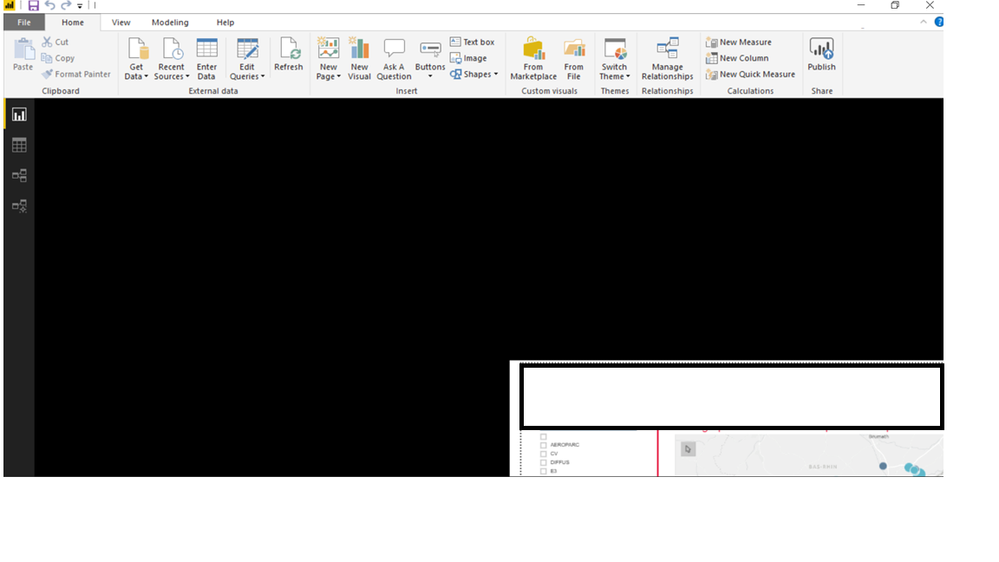
Report and diplayed screen is like below (I've hide some personnal and corporate information not useful) - and I can't do nothing ;
Please tell me what I should do to fix it (Power BI has been uninstalled last week ; it worked then the same problem occured)
Thanks a lot !
Pierre
Solved! Go to Solution.
Check if the following post helps.
http://community.powerbi.com/t5/Desktop/Power-BI-Desktop-canvas-resolution-issue/m-p/372440#M168949
Hello, sorry to "auto answer" my own question but :
we have some people really stuck with this bug ; we tried to uninstall/reinstall but its there again,
In fact "work zone" / the report zone is reduced on the bottom right corner and we can't do nothing,
Tell me if I have post this in the wrong place,
A link to the solution would be great ; I've found this :
https://community.powerbi.com/t5/Desktop/Desktop-view-is-always-starting-in-the-corner/td-p/462425
'll try it soon,
Thanks a lot,
Pierre
Check if the following post helps.
http://community.powerbi.com/t5/Desktop/Power-BI-Desktop-canvas-resolution-issue/m-p/372440#M168949
Thanks a lot !
Pierre
Vote for your favorite vizzies from the Power BI World Championship submissions!
If you love stickers, then you will definitely want to check out our Community Sticker Challenge!
Check out the January 2026 Power BI update to learn about new features.
| User | Count |
|---|---|
| 56 | |
| 52 | |
| 45 | |
| 17 | |
| 16 |
| User | Count |
|---|---|
| 108 | |
| 107 | |
| 39 | |
| 33 | |
| 25 |