Join us at FabCon Atlanta from March 16 - 20, 2026, for the ultimate Fabric, Power BI, AI and SQL community-led event. Save $200 with code FABCOMM.
Register now!Vote for your favorite vizzies from the Power BI Dataviz World Championship submissions. Vote now!
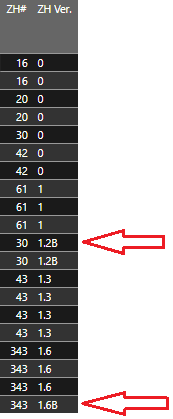
I have 2 columns: ZH# + ZH Versions. ZH# is the item number. ZH Version is the version iteration of the ZH#.
PROBLEM TO SOLVE = How can I get a distinct count of all the ZH# + take into consideration a different ZH Version?
- I currently can successfuly get the distinct count of ZH# but I cannot figure out how to add another filter to my DAX that will take into consideration if there is a different ZH Version used with the same ZH# (please see screenshot below).
Current Output = 7 -> This result is from distinct count of the ZH#
Desired Output = 9 -> This desired output will count all of the distinct ZH# + any other ZH Versions (please see screenshots below...the red arrows will highlight the 2 missing items that should be counted)
Current DAX:
ZH#DistinctCount = DISTINCTCOUNT(ZH[ZH#])
ZHReplacementCount =
I know my current ZHReplacementCount DAX does not take into account the ZH Versions, but I am not sure on how to incorporate it?
Any assistance will be greatly appreciated!
Solved! Go to Solution.
I don't get the logic exactly
ZH#DistinctCount = DISTINCTCOUNT(ZH[ZH#])
returns 7, which is including ZH# 30 which has version 1.3B, which is also the only version for ZH# 30
so it seems to me that output should be 8 not 9, correct?
if you want to count multiple verisons within same ZH# I would probably do something like this
Measure = COUNTROWS ( SUMMARIZE ( ZH, ZH[ZH#], ZH[ZH Ver.] ) )
Hi @Anonymous
You can do that count taking the version into account like this:
NewMeasure = COUNTROWS ( SUMMARIZECOLUMNS ( ZH[ZH#], ZH[ZH Ver.] ) )
If you're going to use this in the SUMX, I guess (you're omitting crucial info on the structure of your tables and existing relationships) you'd need something like this:
ZHReplacementCount_V2 = SUMX ( VALUES ( Programs_Machine[MACHINE_L_NUMBER] ), [NewMeasure] )
Your explanation is quite good but you should include the details of the tables involved and their relationships. Plus please always show your sample data in text-tabular format in addition to (or instead of) the screen captures. That allows people trying to help to readily copy the data and run a quick test (which I haven't been able to do)
Thank you for your support. I will make sure to add additional details about table relationships and show some sample data in text-tablular format in the future.
Apologies for any inconvenience.
I don't get the logic exactly
ZH#DistinctCount = DISTINCTCOUNT(ZH[ZH#])
returns 7, which is including ZH# 30 which has version 1.3B, which is also the only version for ZH# 30
so it seems to me that output should be 8 not 9, correct?
if you want to count multiple verisons within same ZH# I would probably do something like this
Measure = COUNTROWS ( SUMMARIZE ( ZH, ZH[ZH#], ZH[ZH Ver.] ) )
Thank you for your response! Your DAX measure to count multiple versions of ZH# worked! I added your suggestion to my current DAX and it worked:
Vote for your favorite vizzies from the Power BI World Championship submissions!
If you love stickers, then you will definitely want to check out our Community Sticker Challenge!
Check out the January 2026 Power BI update to learn about new features.
| User | Count |
|---|---|
| 64 | |
| 53 | |
| 42 | |
| 20 | |
| 17 |
| User | Count |
|---|---|
| 121 | |
| 103 | |
| 46 | |
| 30 | |
| 24 |