Get certified for free when you join Fabric Data Days 2026 and dive into Fabric, Power BI, SQL, AI, and other essential data skills.
Join nowJuly 7 - July 17 | Round 2 of the Power BI Dataviz World Championships. Don't miss your chance! Learn more
Hi Power Bi Team,
I am Trying to work out this report but i have some difficulties to make this happen.
I have this table where this levels are displayed:
| Fare Type | Route | Month | Company | Lead in fare |
| Restrictive | XXX-YYY | Jun-13 | Company A | 185.00 |
| Restrictive | XXX-YYY | Jun-13 | Company B | 169.00 |
what I need is the fare difference between A and B if:
- Fare type
- Route
- Month
are the same.
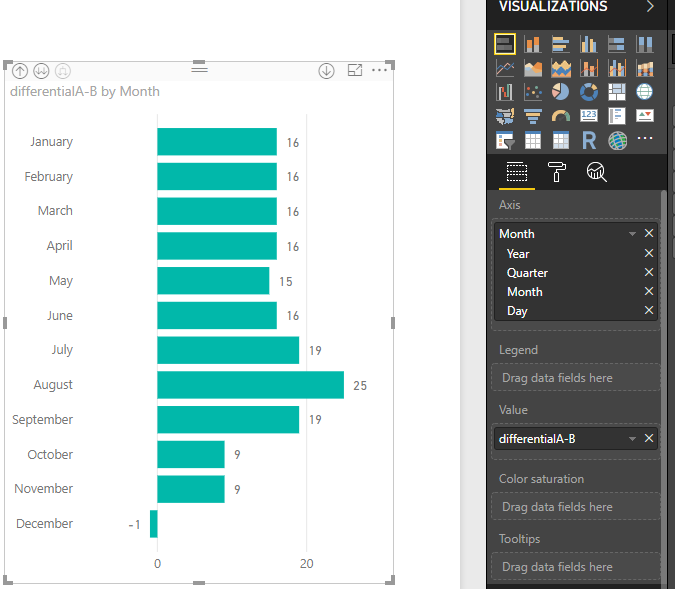
then I have to display this on a bar chart so the differential is displayed throughout the year.
Let me know if you have any ideas in mind.
thank you
Alberto ![]()
Solved! Go to Solution.
Hi @Anonymous
In query editor, please pay attention to the bold characters which you can use for your scenario.
Code in advanced editor,
let
Source = Excel.Workbook(File.Contents("C:\Users\maggiel\Desktop\case\6\6.20\Difference between.xlsx"), null, true),
Sheet1_Sheet = Source{[Item="Sheet1",Kind="Sheet"]}[Data],
#"Promoted Headers" = Table.PromoteHeaders(Sheet1_Sheet, [PromoteAllScalars=true]),
#"Changed Type" = Table.TransformColumnTypes(#"Promoted Headers",{{"Fare Type", type text}, {"Route", type text}, {"Month", type date}, {"Company", type text}, {"Lead in fare", Int64.Type}}),
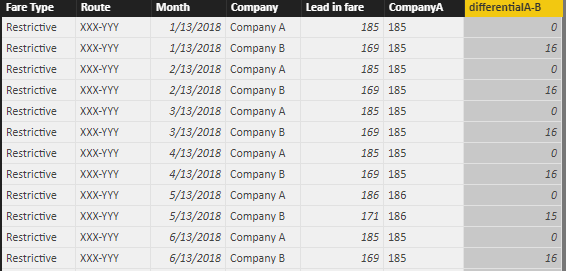
#"Added Conditional Column" = Table.AddColumn(#"Changed Type", "CompanyA", each if Text.Contains([Company], "A") then [Lead in fare] else null),
#"Filled Down" = Table.FillDown(#"Added Conditional Column",{"CompanyA"})
in
#"Filled Down"
Then in Data Model View, create a calculated column
differentialA-B = [CompanyA]-[Lead in fare]
Best Regards
Maggie
Hi @Anonymous
In query editor, please pay attention to the bold characters which you can use for your scenario.
Code in advanced editor,
let
Source = Excel.Workbook(File.Contents("C:\Users\maggiel\Desktop\case\6\6.20\Difference between.xlsx"), null, true),
Sheet1_Sheet = Source{[Item="Sheet1",Kind="Sheet"]}[Data],
#"Promoted Headers" = Table.PromoteHeaders(Sheet1_Sheet, [PromoteAllScalars=true]),
#"Changed Type" = Table.TransformColumnTypes(#"Promoted Headers",{{"Fare Type", type text}, {"Route", type text}, {"Month", type date}, {"Company", type text}, {"Lead in fare", Int64.Type}}),
#"Added Conditional Column" = Table.AddColumn(#"Changed Type", "CompanyA", each if Text.Contains([Company], "A") then [Lead in fare] else null),
#"Filled Down" = Table.FillDown(#"Added Conditional Column",{"CompanyA"})
in
#"Filled Down"
Then in Data Model View, create a calculated column
differentialA-B = [CompanyA]-[Lead in fare]
Best Regards
Maggie
| User | Count |
|---|---|
| 23 | |
| 22 | |
| 20 | |
| 20 | |
| 12 |
| User | Count |
|---|---|
| 62 | |
| 55 | |
| 47 | |
| 44 | |
| 37 |