Get certified for free when you join Fabric Data Days 2026 and dive into Fabric, Power BI, SQL, AI, and other essential data skills.
Join nowTry your skills in the Power BI Dataviz World Championship! Round one ends June 26. Join now
Hi Power Bi Team,
I am Trying to work out this report but i have some difficulties to make this happen.
I have this table where this levels are displayed:
| Fare Type | Route | Month | Company | Lead in fare |
| Restrictive | XXX-YYY | Jun-13 | Company A | 185.00 |
| Restrictive | XXX-YYY | Jun-13 | Company B | 169.00 |
what I need is the fare difference between A and B if:
- Fare type
- Route
- Month
are the same.
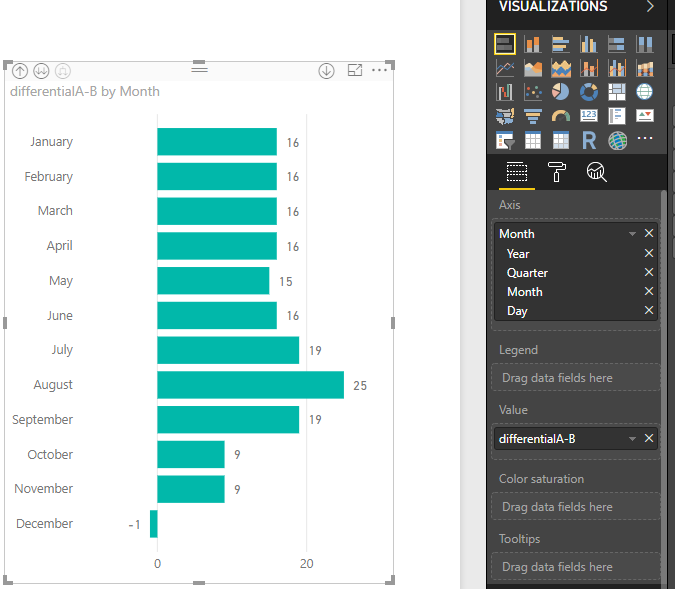
then I have to display this on a bar chart so the differential is displayed throughout the year.
Let me know if you have any ideas in mind.
thank you
Alberto ![]()
Solved! Go to Solution.
Hi @Anonymous
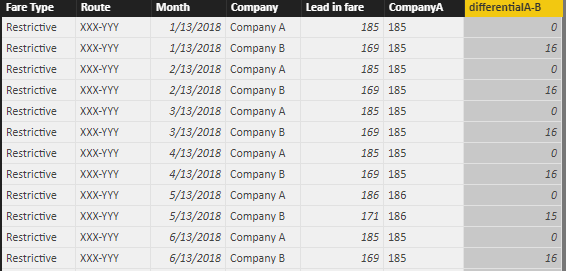
In query editor, please pay attention to the bold characters which you can use for your scenario.
Code in advanced editor,
let
Source = Excel.Workbook(File.Contents("C:\Users\maggiel\Desktop\case\6\6.20\Difference between.xlsx"), null, true),
Sheet1_Sheet = Source{[Item="Sheet1",Kind="Sheet"]}[Data],
#"Promoted Headers" = Table.PromoteHeaders(Sheet1_Sheet, [PromoteAllScalars=true]),
#"Changed Type" = Table.TransformColumnTypes(#"Promoted Headers",{{"Fare Type", type text}, {"Route", type text}, {"Month", type date}, {"Company", type text}, {"Lead in fare", Int64.Type}}),
#"Added Conditional Column" = Table.AddColumn(#"Changed Type", "CompanyA", each if Text.Contains([Company], "A") then [Lead in fare] else null),
#"Filled Down" = Table.FillDown(#"Added Conditional Column",{"CompanyA"})
in
#"Filled Down"
Then in Data Model View, create a calculated column
differentialA-B = [CompanyA]-[Lead in fare]
Best Regards
Maggie
Hi @Anonymous
In query editor, please pay attention to the bold characters which you can use for your scenario.
Code in advanced editor,
let
Source = Excel.Workbook(File.Contents("C:\Users\maggiel\Desktop\case\6\6.20\Difference between.xlsx"), null, true),
Sheet1_Sheet = Source{[Item="Sheet1",Kind="Sheet"]}[Data],
#"Promoted Headers" = Table.PromoteHeaders(Sheet1_Sheet, [PromoteAllScalars=true]),
#"Changed Type" = Table.TransformColumnTypes(#"Promoted Headers",{{"Fare Type", type text}, {"Route", type text}, {"Month", type date}, {"Company", type text}, {"Lead in fare", Int64.Type}}),
#"Added Conditional Column" = Table.AddColumn(#"Changed Type", "CompanyA", each if Text.Contains([Company], "A") then [Lead in fare] else null),
#"Filled Down" = Table.FillDown(#"Added Conditional Column",{"CompanyA"})
in
#"Filled Down"
Then in Data Model View, create a calculated column
differentialA-B = [CompanyA]-[Lead in fare]
Best Regards
Maggie
| User | Count |
|---|---|
| 22 | |
| 20 | |
| 20 | |
| 19 | |
| 11 |
| User | Count |
|---|---|
| 62 | |
| 55 | |
| 46 | |
| 45 | |
| 34 |