Don't miss your chance to take the Fabric Data Engineer (DP-600) exam for FREE! Find out how by attending the DP-600 session on April 23rd (pacific time), live or on-demand.
Learn moreNext up in the FabCon + SQLCon recap series: The roadmap for Microsoft SQL and Maximizing Developer experiences in Fabric. All sessions are available on-demand after the live show. Register now
I have a Table in which it has Stattion Type, total Rev (meaasure) and Year
Matrix Looks this:
| Station Type | 2015 | 2016 | 2017 | 2018 |
| ABC | 10 | 8 | 20 | 15 |
| XYZ | 12 | 6 | 15 | 10 |
And Need Something better or like this
| Station Type | 2015 | 2016 | Difference | 2017 | 2018 | Difference |
| ABC | 10 | 8 | 2 | 20 | 15 | 5 |
| XYZ | 12 | 6 | 6 | 15 | 10 | 5 |
Solved! Go to Solution.
Hi @mohammedkhan ,
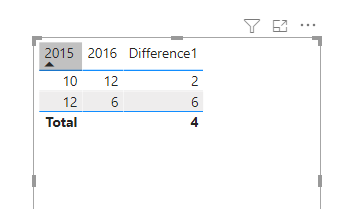
If you drag-and-dropped those columns onto your table, then Power BI automatically creates an implicit measures in the background that likely looks like SUM(Table[2015]) and SUM(Table[2016]). To calculate the difference, create a measure to subtract the second from the first:
Difference1 = SUM('Table'[2015]) - SUM('Table'[2016])
If you need to determine the size of the data corresponding to the year, the larger data is subtracted from the smaller:
Difference1 =
var test1= SUM('Table'[2015])
var test2= SUM('Table'[2016])
var test3=IF(test1>test2,test1-test2,test2-test1)
return test3
Wish it is helpful for you!
Best Regards
Lucien
Hi @mohammedkhan ,
If you drag-and-dropped those columns onto your table, then Power BI automatically creates an implicit measures in the background that likely looks like SUM(Table[2015]) and SUM(Table[2016]). To calculate the difference, create a measure to subtract the second from the first:
Difference1 = SUM('Table'[2015]) - SUM('Table'[2016])
If you need to determine the size of the data corresponding to the year, the larger data is subtracted from the smaller:
Difference1 =
var test1= SUM('Table'[2015])
var test2= SUM('Table'[2016])
var test3=IF(test1>test2,test1-test2,test2-test1)
return test3
Wish it is helpful for you!
Best Regards
Lucien
@mohammedkhan , this kind of custom display , you might not get in matrix. You can diff after every year
With help from a separate year/date table you can get
example measures
This Year = CALCULATE(sum('order'[Qty]),filter(ALL('Date'),'Date'[Year]=max('Date'[Year])))
Last Year = CALCULATE(sum('order'[Qty]),filter(ALL('Date'),'Date'[Year]=max('Date'[Year])-1))
diff = [This Year]-[Last Year ]
diff % = divide([This Year]-[Last Year ],[Last Year ])
check the hybrid display
if you are looking for a Hybrid display with Matrix Column and measure
https://community.powerbi.com/t5/Community-Blog/Creating-a-custom-or-hybrid-matrix-in-PowerBI/ba-p/1...
https://community.powerbi.com/t5/Quick-Measures-Gallery/The-New-Hotness-Custom-Matrix-Hierarchy/m-p/...
vote for Hybrid Table
https://ideas.powerbi.com/ideas/idea/?ideaid=9bc32b23-1eb1-4e74-8b34-349887b37ebc
If you have recently started exploring Fabric, we'd love to hear how it's going. Your feedback can help with product improvements.
A new Power BI DataViz World Championship is coming this June! Don't miss out on submitting your entry.
Share feedback directly with Fabric product managers, participate in targeted research studies and influence the Fabric roadmap.
| User | Count |
|---|---|
| 48 | |
| 45 | |
| 41 | |
| 20 | |
| 17 |
| User | Count |
|---|---|
| 69 | |
| 64 | |
| 32 | |
| 31 | |
| 27 |