Join us at FabCon Atlanta from March 16 - 20, 2026, for the ultimate Fabric, Power BI, AI and SQL community-led event. Save $200 with code FABCOMM.
Register now!The Power BI Data Visualization World Championships is back! Get ahead of the game and start preparing now! Learn more
I have a Table in which it has Stattion Type, total Rev (meaasure) and Year
Matrix Looks this:
| Station Type | 2015 | 2016 | 2017 | 2018 |
| ABC | 10 | 8 | 20 | 15 |
| XYZ | 12 | 6 | 15 | 10 |
And Need Something better or like this
| Station Type | 2015 | 2016 | Difference | 2017 | 2018 | Difference |
| ABC | 10 | 8 | 2 | 20 | 15 | 5 |
| XYZ | 12 | 6 | 6 | 15 | 10 | 5 |
Solved! Go to Solution.
Hi @mohammedkhan ,
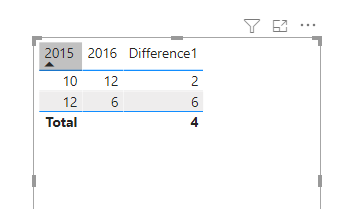
If you drag-and-dropped those columns onto your table, then Power BI automatically creates an implicit measures in the background that likely looks like SUM(Table[2015]) and SUM(Table[2016]). To calculate the difference, create a measure to subtract the second from the first:
Difference1 = SUM('Table'[2015]) - SUM('Table'[2016])
If you need to determine the size of the data corresponding to the year, the larger data is subtracted from the smaller:
Difference1 =
var test1= SUM('Table'[2015])
var test2= SUM('Table'[2016])
var test3=IF(test1>test2,test1-test2,test2-test1)
return test3
Wish it is helpful for you!
Best Regards
Lucien
Hi @mohammedkhan ,
If you drag-and-dropped those columns onto your table, then Power BI automatically creates an implicit measures in the background that likely looks like SUM(Table[2015]) and SUM(Table[2016]). To calculate the difference, create a measure to subtract the second from the first:
Difference1 = SUM('Table'[2015]) - SUM('Table'[2016])
If you need to determine the size of the data corresponding to the year, the larger data is subtracted from the smaller:
Difference1 =
var test1= SUM('Table'[2015])
var test2= SUM('Table'[2016])
var test3=IF(test1>test2,test1-test2,test2-test1)
return test3
Wish it is helpful for you!
Best Regards
Lucien
@mohammedkhan , this kind of custom display , you might not get in matrix. You can diff after every year
With help from a separate year/date table you can get
example measures
This Year = CALCULATE(sum('order'[Qty]),filter(ALL('Date'),'Date'[Year]=max('Date'[Year])))
Last Year = CALCULATE(sum('order'[Qty]),filter(ALL('Date'),'Date'[Year]=max('Date'[Year])-1))
diff = [This Year]-[Last Year ]
diff % = divide([This Year]-[Last Year ],[Last Year ])
check the hybrid display
if you are looking for a Hybrid display with Matrix Column and measure
https://community.powerbi.com/t5/Community-Blog/Creating-a-custom-or-hybrid-matrix-in-PowerBI/ba-p/1...
https://community.powerbi.com/t5/Quick-Measures-Gallery/The-New-Hotness-Custom-Matrix-Hierarchy/m-p/...
vote for Hybrid Table
https://ideas.powerbi.com/ideas/idea/?ideaid=9bc32b23-1eb1-4e74-8b34-349887b37ebc
The Power BI Data Visualization World Championships is back! Get ahead of the game and start preparing now!
| User | Count |
|---|---|
| 40 | |
| 37 | |
| 33 | |
| 29 | |
| 27 |
| User | Count |
|---|---|
| 133 | |
| 104 | |
| 61 | |
| 59 | |
| 55 |