Share feedback directly with Fabric product managers, participate in targeted research studies and influence the Fabric roadmap.
Sign up nowGet Fabric certified for FREE! Don't miss your chance! Learn more
I have a Table in which it has Stattion Type, total Rev (meaasure) and Year
Matrix Looks this:
| Station Type | 2015 | 2016 | 2017 | 2018 |
| ABC | 10 | 8 | 20 | 15 |
| XYZ | 12 | 6 | 15 | 10 |
And Need Something better or like this
| Station Type | 2015 | 2016 | Difference | 2017 | 2018 | Difference |
| ABC | 10 | 8 | 2 | 20 | 15 | 5 |
| XYZ | 12 | 6 | 6 | 15 | 10 | 5 |
Solved! Go to Solution.
Hi @mohammedkhan ,
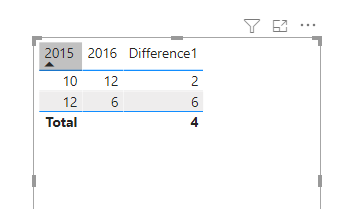
If you drag-and-dropped those columns onto your table, then Power BI automatically creates an implicit measures in the background that likely looks like SUM(Table[2015]) and SUM(Table[2016]). To calculate the difference, create a measure to subtract the second from the first:
Difference1 = SUM('Table'[2015]) - SUM('Table'[2016])
If you need to determine the size of the data corresponding to the year, the larger data is subtracted from the smaller:
Difference1 =
var test1= SUM('Table'[2015])
var test2= SUM('Table'[2016])
var test3=IF(test1>test2,test1-test2,test2-test1)
return test3
Wish it is helpful for you!
Best Regards
Lucien
Hi @mohammedkhan ,
If you drag-and-dropped those columns onto your table, then Power BI automatically creates an implicit measures in the background that likely looks like SUM(Table[2015]) and SUM(Table[2016]). To calculate the difference, create a measure to subtract the second from the first:
Difference1 = SUM('Table'[2015]) - SUM('Table'[2016])
If you need to determine the size of the data corresponding to the year, the larger data is subtracted from the smaller:
Difference1 =
var test1= SUM('Table'[2015])
var test2= SUM('Table'[2016])
var test3=IF(test1>test2,test1-test2,test2-test1)
return test3
Wish it is helpful for you!
Best Regards
Lucien
@mohammedkhan , this kind of custom display , you might not get in matrix. You can diff after every year
With help from a separate year/date table you can get
example measures
This Year = CALCULATE(sum('order'[Qty]),filter(ALL('Date'),'Date'[Year]=max('Date'[Year])))
Last Year = CALCULATE(sum('order'[Qty]),filter(ALL('Date'),'Date'[Year]=max('Date'[Year])-1))
diff = [This Year]-[Last Year ]
diff % = divide([This Year]-[Last Year ],[Last Year ])
check the hybrid display
if you are looking for a Hybrid display with Matrix Column and measure
https://community.powerbi.com/t5/Community-Blog/Creating-a-custom-or-hybrid-matrix-in-PowerBI/ba-p/1...
https://community.powerbi.com/t5/Quick-Measures-Gallery/The-New-Hotness-Custom-Matrix-Hierarchy/m-p/...
vote for Hybrid Table
https://ideas.powerbi.com/ideas/idea/?ideaid=9bc32b23-1eb1-4e74-8b34-349887b37ebc
Share feedback directly with Fabric product managers, participate in targeted research studies and influence the Fabric roadmap.
If you love stickers, then you will definitely want to check out our Community Sticker Challenge!
Check out the January 2026 Power BI update to learn about new features.
| User | Count |
|---|---|
| 62 | |
| 62 | |
| 42 | |
| 21 | |
| 18 |