cancel
Showing results for 
Search instead for 
Did you mean: 

We've captured the moments from FabCon & SQLCon that everyone is talking about, and we are bringing them to the community, live and on-demand. Starts on April 14th. Register now

Reply
Pbilearner02
Frequent Visitor

Developing report

Hi all,

I am a new bee to Power BI and trying to learn while trying to do a report. I have a report as table1.  I had clean the data like two sep table - table 2 and 3.  Finally append them as Table 4.  But now I need the subtotal per week ending


Table 1:                  
Name TitleManagerPillarWeek endingAdminstrativeAdmin sub categoryAd MonAd TueAd Wed Ad ThurAd FriDP supportDP support sub categoryDP MonDp TueDp Wed Dp ThurDP Fri
AAAADBAljdlsjdxyz11/11/2022administrativemeeting12 1 DP supporttraining4 211.5
AAAADBAljdlsjdxyz11/8/2022administrativefiling0.5 11.50DP supporttraining2.521  
                   
Table 2:                  
Name TitleManagerPillarWeek endingCategorysub categoryMon Tue Wed  Thur Fri       
AAAADBAljdlsjdxyz11/11/2022administrativemeeting12 1        
AAAADBAljdlsjdxyz11/8/2022administrativefiling0.5 11.50       
                   
Table 3:                  
Name TitleManagerPillarWeek endingCategorysub categoryMon Tue Wed  Thur Fri       
AAAADBAljdlsjdxyz11/11/2022DP supporttraining4 211.5       
AAAADBAljdlsjdxyz11/8/2022DP supporttraining2.521         
                   
Table 4:                  
Name TitleManagerPillarWeek endingCategorysub categoryMon Tue Wed  Thur Fri       
AAAADBAljdlsjdxyz11/11/2022administrativemeeting12 1        
AAAADBAljdlsjdxyz11/8/2022administrativefiling0.5 11.50       
AAAADBAljdlsjdxyz11/11/2022DP supporttraining4 211.5       
AAAADBAljdlsjdxyz11/8/2022DP supporttraining2.521         


1 ACCEPTED SOLUTION

Hi @Pbilearner02 

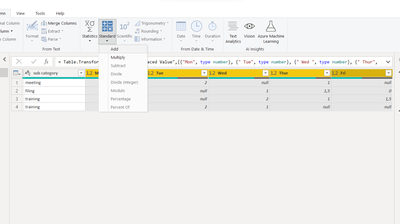
please try this, select the columns then click Standard - Add

vxiaotang_0-1669369382435.png

result

vxiaotang_1-1669369440506.png


Best Regards,

Community Support Team _Tang

If this post helps, please consider Accept it as the solution to help the other members find it more quickly.

View solution in original post

5 REPLIES 5
serpiva64
Solution Sage
Solution Sage

Hi,

to do what you want you need to create a new column by selecting your column and adding them 

serpiva64_0-1668853173611.png

If this post is useful to help you to solve your issue consider giving the post a thumbs up 

 and accepting it as a solution !


Hi Serpiva

can I do it according to the week ending?  If I am collaborating it,  in report developer how can I do total hours per week.

thank you serpiva for all the help.


Hi,

can you post an exemple of your desired result

Hi 

Here is what I want to look the data as :

Name TitleManagerPillarWeek endingCategorysub categoryMon Tue Wed  Thur FriTotal hours
AAAADBAljdlsjdxyz11/11/2022administrativemeeting12 1 4
AAAADBAljdlsjdxyz11/8/2022administrativefiling0.5 11.503
AAAADBAljdlsjdxyz11/11/2022DP supporttraining4 211.58.5
AAAADBAljdlsjdxyz11/8/2022DP supporttraining2.521  5.5

Hi @Pbilearner02 

please try this, select the columns then click Standard - Add

vxiaotang_0-1669369382435.png

result

vxiaotang_1-1669369440506.png


Best Regards,

Community Support Team _Tang

If this post helps, please consider Accept it as the solution to help the other members find it more quickly.

Helpful resources

Announcements
New to Fabric survey Carousel

New to Fabric Survey

If you have recently started exploring Fabric, we'd love to hear how it's going. Your feedback can help with product improvements.

Power BI DataViz World Championships carousel

Power BI DataViz World Championships - June 2026

A new Power BI DataViz World Championship is coming this June! Don't miss out on submitting your entry.

Join our Fabric User Panel

Join our Fabric User Panel

Share feedback directly with Fabric product managers, participate in targeted research studies and influence the Fabric roadmap.