cancel
Showing results for 
Search instead for 
Did you mean: 

July 28 - August 9 | Final Round of the Power BI Dataviz World Championships. This is your chance. Learn more

Reply
Pbilearner02
Frequent Visitor

Developing report

Hi all,

I am a new bee to Power BI and trying to learn while trying to do a report. I have a report as table1.  I had clean the data like two sep table - table 2 and 3.  Finally append them as Table 4.  But now I need the subtotal per week ending


Table 1:                  
Name TitleManagerPillarWeek endingAdminstrativeAdmin sub categoryAd MonAd TueAd Wed Ad ThurAd FriDP supportDP support sub categoryDP MonDp TueDp Wed Dp ThurDP Fri
AAAADBAljdlsjdxyz11/11/2022administrativemeeting12 1 DP supporttraining4 211.5
AAAADBAljdlsjdxyz11/8/2022administrativefiling0.5 11.50DP supporttraining2.521  
                   
Table 2:                  
Name TitleManagerPillarWeek endingCategorysub categoryMon Tue Wed  Thur Fri       
AAAADBAljdlsjdxyz11/11/2022administrativemeeting12 1        
AAAADBAljdlsjdxyz11/8/2022administrativefiling0.5 11.50       
                   
Table 3:                  
Name TitleManagerPillarWeek endingCategorysub categoryMon Tue Wed  Thur Fri       
AAAADBAljdlsjdxyz11/11/2022DP supporttraining4 211.5       
AAAADBAljdlsjdxyz11/8/2022DP supporttraining2.521         
                   
Table 4:                  
Name TitleManagerPillarWeek endingCategorysub categoryMon Tue Wed  Thur Fri       
AAAADBAljdlsjdxyz11/11/2022administrativemeeting12 1        
AAAADBAljdlsjdxyz11/8/2022administrativefiling0.5 11.50       
AAAADBAljdlsjdxyz11/11/2022DP supporttraining4 211.5       
AAAADBAljdlsjdxyz11/8/2022DP supporttraining2.521         


1 ACCEPTED SOLUTION

Hi @Pbilearner02 

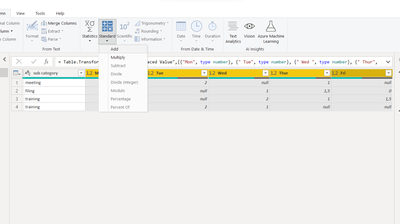
please try this, select the columns then click Standard - Add

vxiaotang_0-1669369382435.png

result

vxiaotang_1-1669369440506.png


Best Regards,

Community Support Team _Tang

If this post helps, please consider Accept it as the solution to help the other members find it more quickly.

View solution in original post

5 REPLIES 5
serpiva64
Solution Sage
Solution Sage

Hi,

to do what you want you need to create a new column by selecting your column and adding them 

serpiva64_0-1668853173611.png

If this post is useful to help you to solve your issue consider giving the post a thumbs up 

 and accepting it as a solution !


Hi Serpiva

can I do it according to the week ending?  If I am collaborating it,  in report developer how can I do total hours per week.

thank you serpiva for all the help.


Hi,

can you post an exemple of your desired result

Hi 

Here is what I want to look the data as :

Name TitleManagerPillarWeek endingCategorysub categoryMon Tue Wed  Thur FriTotal hours
AAAADBAljdlsjdxyz11/11/2022administrativemeeting12 1 4
AAAADBAljdlsjdxyz11/8/2022administrativefiling0.5 11.503
AAAADBAljdlsjdxyz11/11/2022DP supporttraining4 211.58.5
AAAADBAljdlsjdxyz11/8/2022DP supporttraining2.521  5.5

Hi @Pbilearner02 

please try this, select the columns then click Standard - Add

vxiaotang_0-1669369382435.png

result

vxiaotang_1-1669369440506.png


Best Regards,

Community Support Team _Tang

If this post helps, please consider Accept it as the solution to help the other members find it more quickly.

Helpful resources

Announcements
FabCon and SQLCon Barcelona 2026

FabCon & SQLCon – Barcelona 2026

Join us in Barcelona for FabCon and SQLCon, the Fabric, Power BI, SQL, and AI community event. Save €200 with code FABCMTY200.

Fabric Community Sticker Design Challenge Barcelona Carousel

Fabric Community Sticker Challenge - Barcelona 2026

If you love stickers, then you will definitely want to check out our community sticker challenge, Barcelona edition!

July Power BI Update Carousel

Power BI Monthly Update - July 2026

Check out the July 2026 Power BI update to learn about new features.

Power BI DataViz World Championships carousel

Power BI DataViz World Championships - June 2026

A new Power BI DataViz World Championship is coming this June! Don't miss out on submitting your entry.

Top Solution Authors