cancel
Showing results for 
Search instead for 
Did you mean: 

Get Fabric Certified for FREE during Fabric Data Days. Don't miss your chance! Request now

Reply
Anonymous
Not applicable

Date format problem

How to change the format from 2020-02-11T08:45:58.6470000 to 2020-02-11 in power bi, it returns wrong date and month if i'm using the format function

1 ACCEPTED SOLUTION
MFelix
Super User
Super User

Hi @Anonymous ,


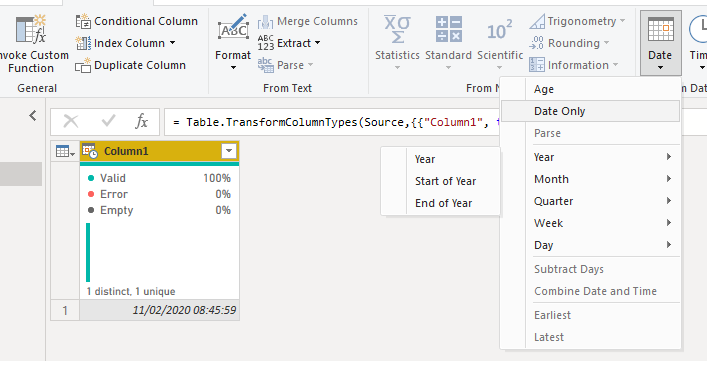
On the query editor be sure that you have the format of the columns as Date/Time then go to add column and select the Date Only, this will give you a new column with only the date part should work as expected.


date.png


then delete the initial column


Regards

Miguel Félix


Did I answer your question? Mark my post as a solution!

Proud to be a Super User!

Check out my blog: Power BI em Português


View solution in original post

2 REPLIES 2
MFelix
Super User
Super User

Hi @Anonymous ,


On the query editor be sure that you have the format of the columns as Date/Time then go to add column and select the Date Only, this will give you a new column with only the date part should work as expected.


date.png


then delete the initial column


Regards

Miguel Félix


Did I answer your question? Mark my post as a solution!

Proud to be a Super User!

Check out my blog: Power BI em Português


Anonymous
Not applicable

Thank you

Helpful resources

Announcements
Fabric Data Days Carousel

Fabric Data Days

Advance your Data & AI career with 50 days of live learning, contests, hands-on challenges, study groups & certifications and more!

October Power BI Update Carousel

Power BI Monthly Update - October 2025

Check out the October 2025 Power BI update to learn about new features.

FabCon Atlanta 2026 carousel

FabCon Atlanta 2026

Join us at FabCon Atlanta, March 16-20, for the ultimate Fabric, Power BI, AI and SQL community-led event. Save $200 with code FABCOMM.

Top Solution Authors