Get certified for free when you join Fabric Data Days 2026 and dive into Fabric, Power BI, SQL, AI, and other essential data skills.
Join nowJuly 28 - August 9 | Final Round of the Power BI Dataviz World Championships. This is your chance. Learn more
Hello,
Despite reading a lot of material about this issue I am not able to achive the soluntion I require.
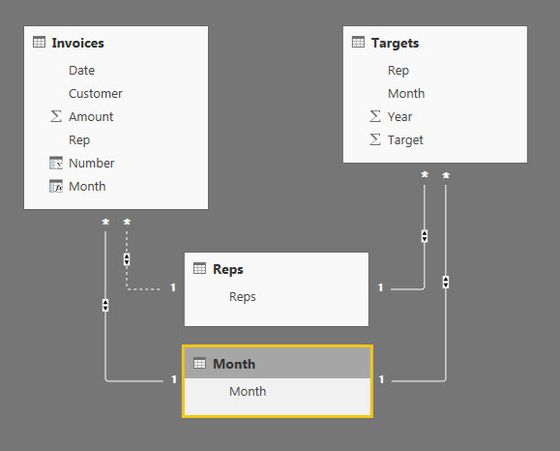
I basically have 2 key tables. Sales information that include date and salesrep and a tabel containing monthly sales targets for salereps. I require 2 types of analysis: Sales information by salesrep against target and sales information for each salesrep per month against target. I can achieve the first by creating a linking table of Salesreps. However I am not able to create a second linking table for months without making the link to Salesreps inactive. Documentation suggests creating a copy of tables but I dont understand how this would work.
I would really appreciate help to solve this, since this must be a very common issue.
Thanks, Phillip
There is a lot to learn. I recommend reading my 2 articles here first.
https://exceleratorbi.com.au/relationships-power-bi-power-pivot/
https://exceleratorbi.com.au/multiple-relationships-between-tables-in-dax/
Join us in Barcelona for FabCon and SQLCon, the Fabric, Power BI, SQL, and AI community event. Save €200 with code FABCMTY200.
If you love stickers, then you will definitely want to check out our community sticker challenge, Barcelona edition!
Check out the July 2026 Power BI update to learn about new features.
| User | Count |
|---|---|
| 25 | |
| 23 | |
| 23 | |
| 17 | |
| 14 |
| User | Count |
|---|---|
| 25 | |
| 24 | |
| 20 | |
| 20 | |
| 19 |