Don't miss your chance to take the Fabric Data Engineer (DP-600) exam for FREE! Find out how by watching the DP-600 session on-demand now through April 28th.
Learn moreJoin the FabCon + SQLCon recap series. Up next: Power BI, Real-Time Intelligence, IQ and AI, and Data Factory take center stage. All sessions are available on-demand after the live show. Register now
Hello,
Despite reading a lot of material about this issue I am not able to achive the soluntion I require.
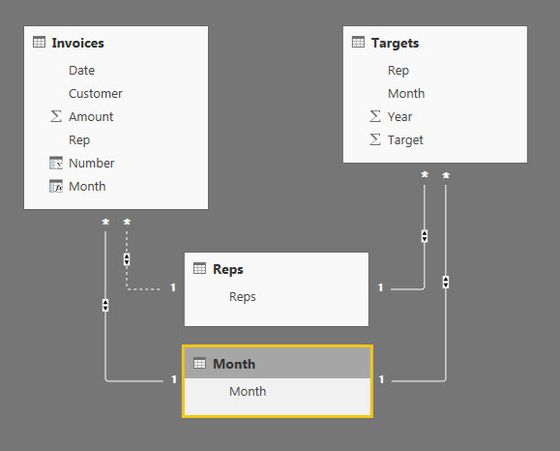
I basically have 2 key tables. Sales information that include date and salesrep and a tabel containing monthly sales targets for salereps. I require 2 types of analysis: Sales information by salesrep against target and sales information for each salesrep per month against target. I can achieve the first by creating a linking table of Salesreps. However I am not able to create a second linking table for months without making the link to Salesreps inactive. Documentation suggests creating a copy of tables but I dont understand how this would work.
I would really appreciate help to solve this, since this must be a very common issue.
Thanks, Phillip
There is a lot to learn. I recommend reading my 2 articles here first.
https://exceleratorbi.com.au/relationships-power-bi-power-pivot/
https://exceleratorbi.com.au/multiple-relationships-between-tables-in-dax/
Check out the April 2026 Power BI update to learn about new features.
If you have recently started exploring Fabric, we'd love to hear how it's going. Your feedback can help with product improvements.
A new Power BI DataViz World Championship is coming this June! Don't miss out on submitting your entry.
| User | Count |
|---|---|
| 48 | |
| 40 | |
| 38 | |
| 20 | |
| 17 |
| User | Count |
|---|---|
| 68 | |
| 65 | |
| 30 | |
| 26 | |
| 25 |