cancel
Showing results for 
Search instead for 
Did you mean: 

Vote for your favorite vizzies from the Power BI Dataviz World Championship submissions. Vote now!

Reply
Anonymous
Not applicable

Date Filter

Hi All, 

I have two tables like below:

table1.JPGtable2.JPG

I created a relationship between two tables using ProductID.

Then I created the following table and added a date slicer. My output is shown below. (Here, nov 2 is selected)

output.JPG

Here, for category X, product C target is not taken and for category Y, product E target is not taken.

But I want my output as below:

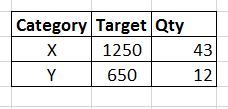
need.JPG

Is there a way to get the above output?

Thank You.


1 ACCEPTED SOLUTION

@Anonymous


hi, you can obtain with this: 


TargetAll = CALCULATE(SUM(Table1[Target]),ALL(Table2[Date]))


Lima - Peru

View solution in original post

5 REPLIES 5
BhaveshPatel
Super User
Super User

You can achieve the output by creating a new calculated column in your table 1 using below syntax.


Quantity = SUMX(RELATEDTABLE(Table2),Table2[Qty])


and the expected output is shown in the screenshot.1111111111111111.PNG


Thanks & Regards,
Bhavesh

Love the Self Service BI.
Please use the 'Mark as answer' link to mark a post that answers your question. If you find a reply helpful, please remember to give Kudos.
Anonymous
Not applicable

Hi @BhaveshPatel

Thank you for your reply.

But this is not what I want. When I select nov 2 in date slicer, I want to show the Qty for nov 2 only. In your output, the Qty for category X is 83. But I want to display 43 when I select nov 2 in date slicer. Please see below:

need.JPG

@Anonymous

You can check that  I have not selected slicer in the screenshot. once you select the slicer, it will cross filter the values of X and Y as expected by you.


Thanks & Regards,
Bhavesh

Love the Self Service BI.
Please use the 'Mark as answer' link to mark a post that answers your question. If you find a reply helpful, please remember to give Kudos.

@Anonymous


hi, you can obtain with this: 


TargetAll = CALCULATE(SUM(Table1[Target]),ALL(Table2[Date]))


Lima - Peru
Anonymous
Not applicable

Hi @Vvelarde,

It worked. Thank you very much:)

Helpful resources

Announcements
Power BI DataViz World Championships

Power BI Dataviz World Championships

Vote for your favorite vizzies from the Power BI World Championship submissions!

Sticker Challenge 2026 Carousel

Join our Community Sticker Challenge 2026

If you love stickers, then you will definitely want to check out our Community Sticker Challenge!

January Power BI Update Carousel

Power BI Monthly Update - January 2026

Check out the January 2026 Power BI update to learn about new features.

FabCon Atlanta 2026 carousel

FabCon Atlanta 2026

Join us at FabCon Atlanta, March 16-20, for the ultimate Fabric, Power BI, AI and SQL community-led event. Save $200 with code FABCOMM.