Join us at FabCon Atlanta from March 16 - 20, 2026, for the ultimate Fabric, Power BI, AI and SQL community-led event. Save $200 with code FABCOMM.
Register now!Vote for your favorite vizzies from the Power BI Dataviz World Championship submissions. Vote now!
Hi All,
I have two tables like below:
I created a relationship between two tables using ProductID.
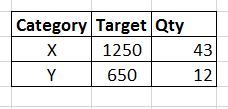
Then I created the following table and added a date slicer. My output is shown below. (Here, nov 2 is selected)
Here, for category X, product C target is not taken and for category Y, product E target is not taken.
But I want my output as below:
Is there a way to get the above output?
Thank You.
Solved! Go to Solution.
@Anonymous
hi, you can obtain with this:
TargetAll = CALCULATE(SUM(Table1[Target]),ALL(Table2[Date]))
You can achieve the output by creating a new calculated column in your table 1 using below syntax.
Quantity = SUMX(RELATEDTABLE(Table2),Table2[Qty])
and the expected output is shown in the screenshot.
Thank you for your reply.
But this is not what I want. When I select nov 2 in date slicer, I want to show the Qty for nov 2 only. In your output, the Qty for category X is 83. But I want to display 43 when I select nov 2 in date slicer. Please see below:
@Anonymous
You can check that I have not selected slicer in the screenshot. once you select the slicer, it will cross filter the values of X and Y as expected by you.
@Anonymous
hi, you can obtain with this:
TargetAll = CALCULATE(SUM(Table1[Target]),ALL(Table2[Date]))
Vote for your favorite vizzies from the Power BI World Championship submissions!
If you love stickers, then you will definitely want to check out our Community Sticker Challenge!
Check out the January 2026 Power BI update to learn about new features.
| User | Count |
|---|---|
| 56 | |
| 53 | |
| 40 | |
| 17 | |
| 16 |
| User | Count |
|---|---|
| 117 | |
| 107 | |
| 42 | |
| 32 | |
| 26 |