Don't miss your chance to take the Fabric Data Engineer (DP-600) exam for FREE! Find out how by attending the DP-600 session on April 23rd (pacific time), live or on-demand.
Learn moreNext up in the FabCon + SQLCon recap series: The roadmap for Microsoft SQL and Maximizing Developer experiences in Fabric. All sessions are available on-demand after the live show. Register now
Hi All,
I have two tables like below:
I created a relationship between two tables using ProductID.
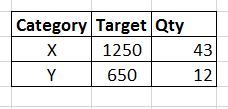
Then I created the following table and added a date slicer. My output is shown below. (Here, nov 2 is selected)
Here, for category X, product C target is not taken and for category Y, product E target is not taken.
But I want my output as below:
Is there a way to get the above output?
Thank You.
Solved! Go to Solution.
@Anonymous
hi, you can obtain with this:
TargetAll = CALCULATE(SUM(Table1[Target]),ALL(Table2[Date]))
You can achieve the output by creating a new calculated column in your table 1 using below syntax.
Quantity = SUMX(RELATEDTABLE(Table2),Table2[Qty])
and the expected output is shown in the screenshot.
Thank you for your reply.
But this is not what I want. When I select nov 2 in date slicer, I want to show the Qty for nov 2 only. In your output, the Qty for category X is 83. But I want to display 43 when I select nov 2 in date slicer. Please see below:
@Anonymous
You can check that I have not selected slicer in the screenshot. once you select the slicer, it will cross filter the values of X and Y as expected by you.
@Anonymous
hi, you can obtain with this:
TargetAll = CALCULATE(SUM(Table1[Target]),ALL(Table2[Date]))
If you have recently started exploring Fabric, we'd love to hear how it's going. Your feedback can help with product improvements.
A new Power BI DataViz World Championship is coming this June! Don't miss out on submitting your entry.
Experience the highlights from FabCon & SQLCon, available live and on-demand starting April 14th.
| User | Count |
|---|---|
| 48 | |
| 46 | |
| 41 | |
| 20 | |
| 17 |
| User | Count |
|---|---|
| 70 | |
| 69 | |
| 32 | |
| 27 | |
| 26 |