Learn from the best! Meet the four finalists headed to the FINALS of the Power BI Dataviz World Championships! Register now
Hi All,
I have two tables like below:
I created a relationship between two tables using ProductID.
Then I created the following table and added a date slicer. My output is shown below. (Here, nov 2 is selected)
Here, for category X, product C target is not taken and for category Y, product E target is not taken.
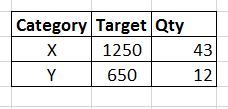
But I want my output as below:
Is there a way to get the above output?
Thank You.
Solved! Go to Solution.
@Anonymous
hi, you can obtain with this:
TargetAll = CALCULATE(SUM(Table1[Target]),ALL(Table2[Date]))
You can achieve the output by creating a new calculated column in your table 1 using below syntax.
Quantity = SUMX(RELATEDTABLE(Table2),Table2[Qty])
and the expected output is shown in the screenshot.
Thank you for your reply.
But this is not what I want. When I select nov 2 in date slicer, I want to show the Qty for nov 2 only. In your output, the Qty for category X is 83. But I want to display 43 when I select nov 2 in date slicer. Please see below:
@Anonymous
You can check that I have not selected slicer in the screenshot. once you select the slicer, it will cross filter the values of X and Y as expected by you.
@Anonymous
hi, you can obtain with this:
TargetAll = CALCULATE(SUM(Table1[Target]),ALL(Table2[Date]))
If you have recently started exploring Fabric, we'd love to hear how it's going. Your feedback can help with product improvements.
A new Power BI DataViz World Championship is coming this June! Don't miss out on submitting your entry.
Share feedback directly with Fabric product managers, participate in targeted research studies and influence the Fabric roadmap.
| User | Count |
|---|---|
| 57 | |
| 38 | |
| 33 | |
| 19 | |
| 16 |
| User | Count |
|---|---|
| 68 | |
| 66 | |
| 41 | |
| 34 | |
| 24 |