
cancel
Showing results for 
Search instead for 
Did you mean: 

July 7 - July 17 | Round 2 of the Power BI Dataviz World Championships. Don't miss your chance! Learn more

Reply
Amir851
Helper I
Helper I

Dataset in Python visual is not loaded

Hi All,


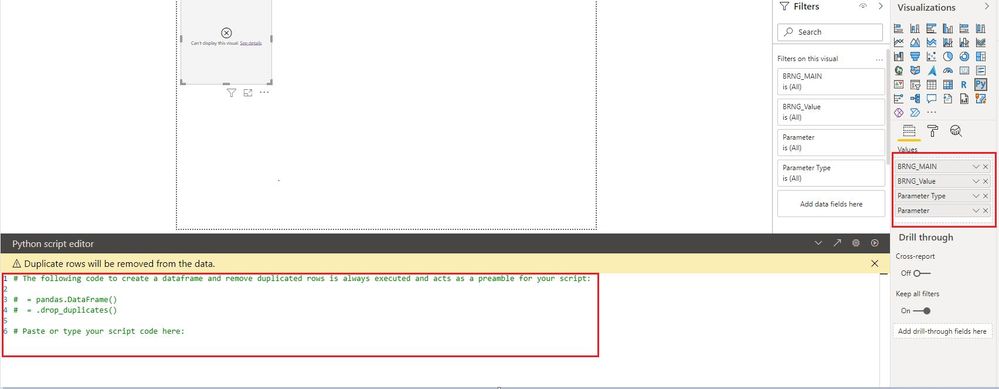
When I try to drag and drop the fields from the table into python visual, I can see that python visual is not loading those fields into python visual as a data frame. 

Someone, please advise me on this and please let me know if I am missing something here.

Below is the sample screenshot for your reference


error.JPG


Thanks

Amir

5 REPLIES 5
Anonymous
Not applicable

@Amir851 

These are some related limitations of using Python in power bi, you can check:

You can also check whether Power BI supports your current Python version and update power bi desktop to the latest version

https://docs.microsoft.com/en-us/power-bi/connect-data/desktop-python-visuals#known-limitations

https://docs.microsoft.com/en-us/power-bi/connect-data/service-python-packages-support#requirements-...

https://docs.microsoft.com/en-us/power-bi/connect-data/desktop-python-scripts

https://community.powerbi.com/t5/Desktop/Can-t-Display-Python-Visual/m-p/680281


If so, can you click See details, we can better understand the error content inside.

Vpazhenmsft_1-1630315092919.png


Best Regards,

If this post helps, then please consider Accept it as the solution to help the other members find it more quickly.

amitchandak
Super User
Super User

@Amir851 , Can you write some code and try.


Also, share the error  details from seeing details

How to create python visual: https://youtu.be/rX3-G8u5fwc

Share with Power BI Enthusiasts: Full Power BI Video (20 Hours) YouTube
Microsoft Fabric Series 60+ Videos YouTube
Microsoft Fabric Hindi End to End YouTube

Did that already but if data frame is not properly loaded then how can I plot a chart. The issue is that the visual is not loading any fields into the dataset.

@Amir851 , Can you share a sample pbix after removing sensitive data.

Share with Power BI Enthusiasts: Full Power BI Video (20 Hours) YouTube
Microsoft Fabric Series 60+ Videos YouTube
Microsoft Fabric Hindi End to End YouTube
Anonymous
Not applicable

Hi all, 


did you manage to solve this problem?


I'm having the same issue. It's really frustrating...

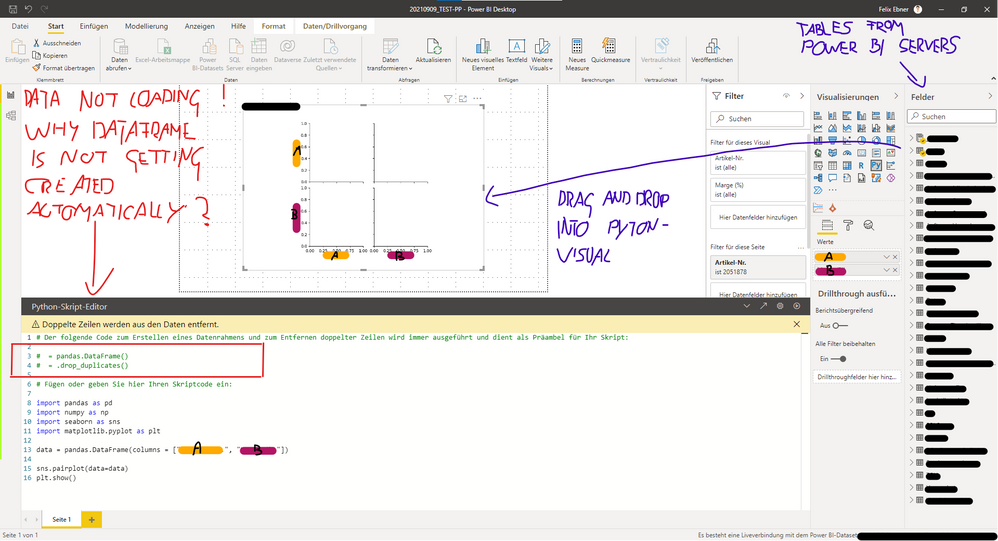
I've added a screenshot of my code down below. 


Some key points / information:

- Python visual is working fine, but not loading the data.

- My data is coming from a Power BI Dataset created and managed by my employer.

- I've created a new virtual enviroment and installed the compatible versions of python and the packages.

(with pip and conda - tried both)

- I'm working with Anaconda


Could it be that there a limitations when using a pre build Power BI Dataset?

(I'm not able to use the Power Query Editor on that dataset, nor can I combine it with a additional data source)


I would be extremely thankful if someone has a clue or solution for this problem!


Thanks in advance.


Best regards,

Felix


Screenshot 2021-09-10 082351.png

Helpful resources

Announcements
FabCon and SQLCon Barcelona 2026

FabCon & SQLCon – Barcelona 2026

Join us in Barcelona for FabCon and SQLCon, the Fabric, Power BI, SQL, and AI community event. Save €200 with code FABCMTY200.

60 days of Data Days Carousel

Data Days 2026

Join Data Days 2026: 60 days of free live/on-demand sessions, challenges, study groups, and certification opportunities.

Power BI DataViz World Championships carousel

Power BI DataViz World Championships - June 2026

A new Power BI DataViz World Championship is coming this June! Don't miss out on submitting your entry.

Top Solution Authors