
This time we’re going bigger than ever. Fabric, Power BI, SQL, AI and more. We're covering it all. You won't want to miss it.
Learn moreDid you hear? There's a new SQL AI Developer certification (DP-800). Start preparing now and be one of the first to get certified. Register now
Hi All,
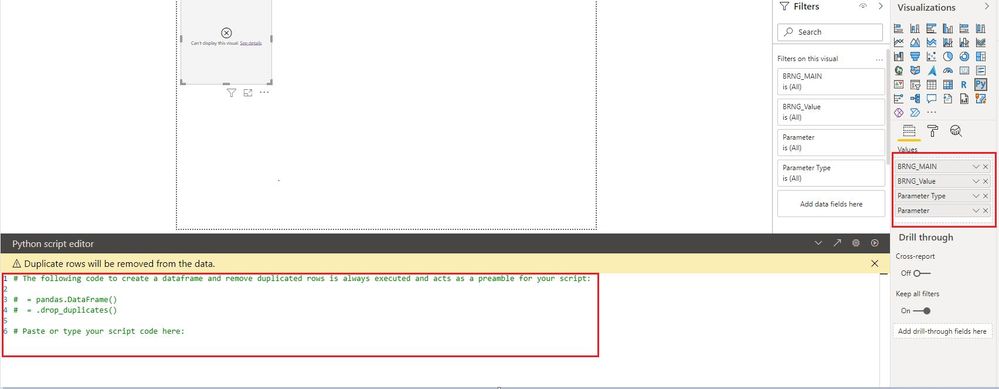
When I try to drag and drop the fields from the table into python visual, I can see that python visual is not loading those fields into python visual as a data frame.
Someone, please advise me on this and please let me know if I am missing something here.
Below is the sample screenshot for your reference
Thanks
Amir
These are some related limitations of using Python in power bi, you can check:
You can also check whether Power BI supports your current Python version and update power bi desktop to the latest version
https://docs.microsoft.com/en-us/power-bi/connect-data/desktop-python-visuals#known-limitations
https://docs.microsoft.com/en-us/power-bi/connect-data/desktop-python-scripts
https://community.powerbi.com/t5/Desktop/Can-t-Display-Python-Visual/m-p/680281
If so, can you click See details, we can better understand the error content inside.
Best Regards,
If this post helps, then please consider Accept it as the solution to help the other members find it more quickly.
@Amir851 , Can you write some code and try.
Also, share the error details from seeing details
How to create python visual: https://youtu.be/rX3-G8u5fwc
Did that already but if data frame is not properly loaded then how can I plot a chart. The issue is that the visual is not loading any fields into the dataset.
Hi all,
did you manage to solve this problem?
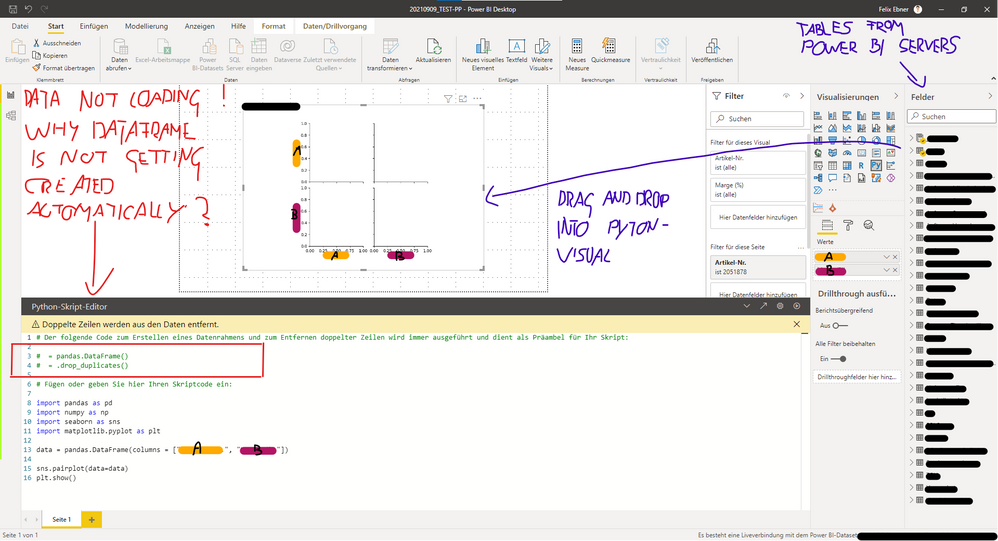
I'm having the same issue. It's really frustrating...
I've added a screenshot of my code down below.
Some key points / information:
- Python visual is working fine, but not loading the data.
- My data is coming from a Power BI Dataset created and managed by my employer.
- I've created a new virtual enviroment and installed the compatible versions of python and the packages.
(with pip and conda - tried both)
- I'm working with Anaconda
Could it be that there a limitations when using a pre build Power BI Dataset?
(I'm not able to use the Power Query Editor on that dataset, nor can I combine it with a additional data source)
I would be extremely thankful if someone has a clue or solution for this problem!
Thanks in advance.
Best regards,
Felix
Check out the April 2026 Power BI update to learn about new features.
Sign up to receive a private message when registration opens and key events begin.
If you have recently started exploring Fabric, we'd love to hear how it's going. Your feedback can help with product improvements.
| User | Count |
|---|---|
| 36 | |
| 33 | |
| 31 | |
| 21 | |
| 16 |
| User | Count |
|---|---|
| 66 | |
| 55 | |
| 31 | |
| 26 | |
| 23 |