Get certified for free when you join Fabric Data Days 2026 and dive into Fabric, Power BI, SQL, AI, and other essential data skills.
Join nowTry your skills in the Power BI Dataviz World Championship! Round one ends June 26. Join now
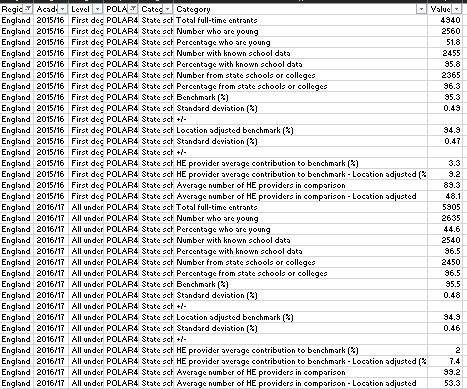
Hello, I wonder if anyone could advise on how best to start transforming this data for analysis/presentation in a pivot or matrix table:
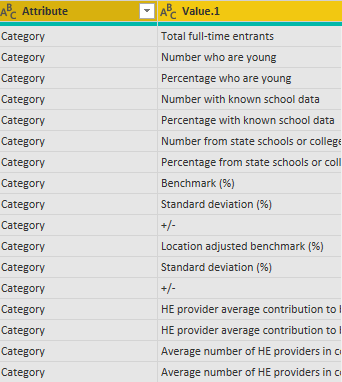
I am struggling with the category/value columns. Do I need to unpivot the category column (I did try this but it didn't seem to help)?
Many thanks,
A
Solved! Go to Solution.
Thanks to your link @amitchandak I discovered it's pivot I need on category column, not unpivot! I am a step closer, thank you.
@adavid999 , if there are not too many values then you should unpivot. What is the problem you are getting.
If this does not help
https://radacad.com/pivot-and-unpivot-with-power-bi
Refer if these can help
https://docs.microsoft.com/en-us/powerquery-m/table-unpivot
https://community.powerbi.com/t5/Desktop/need-help-with-M-query-to-unpivot/td-p/196255
Thanks to your link @amitchandak I discovered it's pivot I need on category column, not unpivot! I am a step closer, thank you.
Thanks @amitchandak do you mean unpivot on the category and value column (there are not too many categories - 17). When i try this I don't get the results I expect. I will look at the links you sent, thank you.
Sorry @Greg_Deckler yes, I sent that in desperation after staring at it for hours....I would like the category repeating items to be columns and region/year/level/POLAR/category etc to be filters or nested row labels.
Cheers,
A
| User | Count |
|---|---|
| 24 | |
| 22 | |
| 22 | |
| 21 | |
| 13 |
| User | Count |
|---|---|
| 66 | |
| 56 | |
| 45 | |
| 44 | |
| 30 |