Share feedback directly with Fabric product managers, participate in targeted research studies and influence the Fabric roadmap.
Sign up nowGet Fabric certified for FREE! Don't miss your chance! Learn more
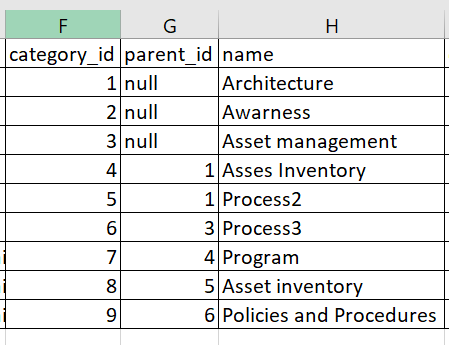
I have the following data.
Hi,All.
I have data in this format.
I need to build matrix visualization with the following hierarchy like:
Architecture ->
->Asses Inventory
->Program
->Process
-> Asset Inventoryand so on.
Should I split the table and build a different data model to achieve this?
PS- Ignore the typo Asses inventory.
Any help is appreciated. Thanks
Solved! Go to Solution.
@Anonymous , refer if this can help
Slicer is shown , but you can display matrix
@Anonymous , refer if this can help
Slicer is shown , but you can display matrix
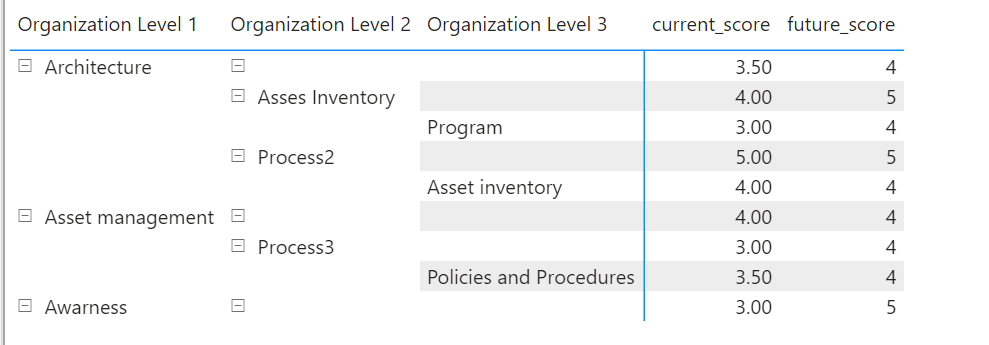
Thanks Amit, it solved 95% of the problem. When I try to display it in a matrix, I have some blank rows. I do not want that.
How can I get rid of rows with blank data?
Here are the columns that I have created:
Thanks 🙂
Share feedback directly with Fabric product managers, participate in targeted research studies and influence the Fabric roadmap.
If you love stickers, then you will definitely want to check out our Community Sticker Challenge!
Check out the January 2026 Power BI update to learn about new features.
| User | Count |
|---|---|
| 62 | |
| 62 | |
| 42 | |
| 21 | |
| 18 |