This is best Fabric, Power BI, SQL and AI community event. How do we know? The last event sold out! Save €200 with code FABCMTY200.
Register nowThe Fabric community is now in read-only for platform upgrade. Learn more
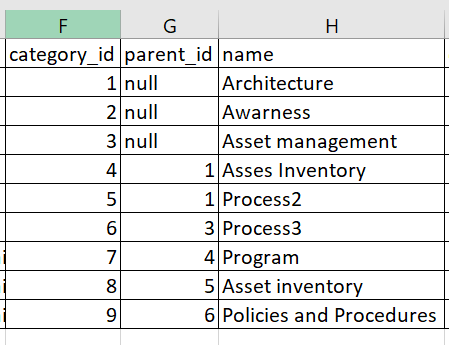
I have the following data.
Hi,All.
I have data in this format.
I need to build matrix visualization with the following hierarchy like:
Architecture ->
->Asses Inventory
->Program
->Process
-> Asset Inventoryand so on.
Should I split the table and build a different data model to achieve this?
PS- Ignore the typo Asses inventory.
Any help is appreciated. Thanks
Solved! Go to Solution.
@Anonymous , refer if this can help
Slicer is shown , but you can display matrix
@Anonymous , refer if this can help
Slicer is shown , but you can display matrix
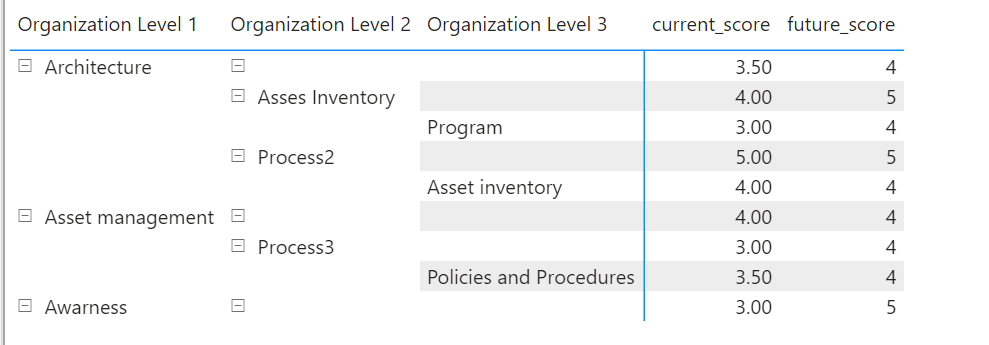
Thanks Amit, it solved 95% of the problem. When I try to display it in a matrix, I have some blank rows. I do not want that.
How can I get rid of rows with blank data?
Here are the columns that I have created:
Thanks 🙂
Join us in Barcelona for FabCon and SQLCon, the Fabric, Power BI, SQL, and AI community event. Save €200 with code FABCMTY200.
| User | Count |
|---|---|
| 23 | |
| 22 | |
| 14 | |
| 14 | |
| 13 |
| User | Count |
|---|---|
| 47 | |
| 39 | |
| 24 | |
| 20 | |
| 20 |