Share feedback directly with Fabric product managers, participate in targeted research studies and influence the Fabric roadmap.
Sign up nowGet Fabric certified for FREE! Don't miss your chance! Learn more
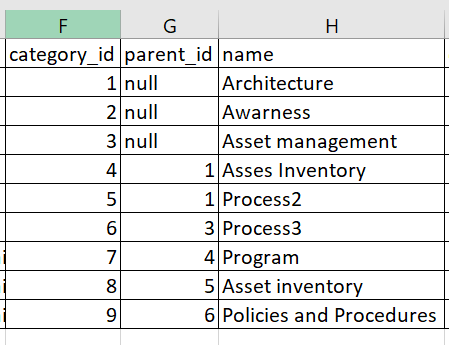
I have the following data.
Hi,All.
I have data in this format.
I need to build matrix visualization with the following hierarchy like:
Architecture ->
->Asses Inventory
->Program
->Process
-> Asset Inventoryand so on.
Should I split the table and build a different data model to achieve this?
PS- Ignore the typo Asses inventory.
Any help is appreciated. Thanks
Solved! Go to Solution.
@Anonymous , refer if this can help
Slicer is shown , but you can display matrix
@Anonymous , refer if this can help
Slicer is shown , but you can display matrix
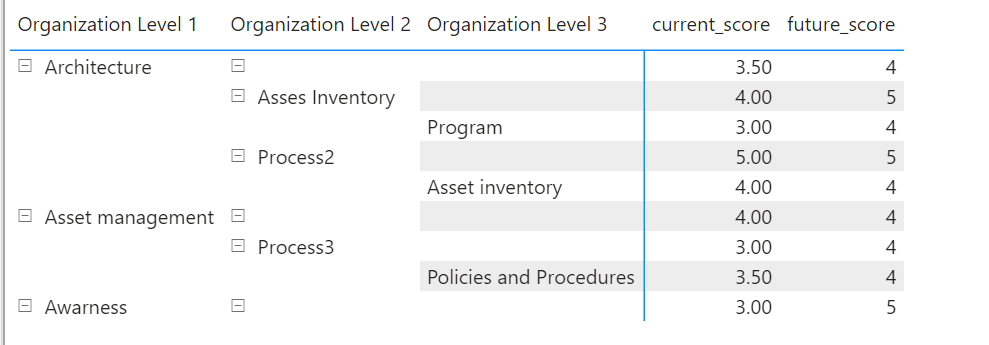
Thanks Amit, it solved 95% of the problem. When I try to display it in a matrix, I have some blank rows. I do not want that.
How can I get rid of rows with blank data?
Here are the columns that I have created:
Thanks 🙂
If you love stickers, then you will definitely want to check out our Community Sticker Challenge!
Check out the January 2026 Power BI update to learn about new features.
| User | Count |
|---|---|
| 64 | |
| 63 | |
| 49 | |
| 21 | |
| 18 |
| User | Count |
|---|---|
| 121 | |
| 118 | |
| 38 | |
| 36 | |
| 29 |