cancel
Showing results for 
Search instead for 
Did you mean: 

Learn from the best! Meet the four finalists headed to the FINALS of the Power BI Dataviz World Championships! Register now

Reply
Anonymous
Not applicable

Data Manipulation/Calculated Column Creation Help

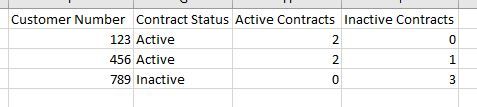
Hello, I am perplexed by a problem on how to manipulate my data.  Essentially, I need to create a new column that determines if a customer account is active or inactive based on whether they have any active contracts or not. My raw data is presented like this:

Origin.jpg


I need to make the above table look like this:

Output.jpg

Once I am able to display the above, I can manipulate it to provide the appropriate counts, etc.

1 ACCEPTED SOLUTION
Anonymous
Not applicable

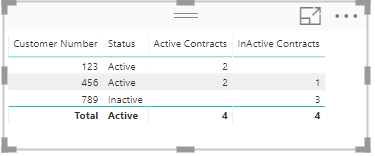
Hi @Anonymous


Create 3 measures for this.

Status = IF([Active Contracts]>0, "Active","Inactive")

Active Contracts =  CALCULATE(COUNT('Status Column'[Contract Number]), FILTER('Status Column','Status Column'[Status]="Active"))

InActive Contracts = CALCULATE(COUNT('Status Column'[Contract Number]), FILTER('Status Column','Status Column'[Status]="Inactive"))

Status.PNG 


Hope this is clear.


Thanks
Raj

View solution in original post

5 REPLIES 5
Anonymous
Not applicable

Hi

  Can you please post the data in text format so that it can be copied?


Thanks
Raj

Anonymous
Not applicable


Here you go:

Customer NumberContract NumberContract Status
1231000TRUE
1232000TRUE
4563000FALSE
4564000TRUE
4565000

TRUE

7896000

FALSE

7897000

FALSE

7898000

FALSE


Anonymous
Not applicable

Hi @Anonymous


Create 3 measures for this.

Status = IF([Active Contracts]>0, "Active","Inactive")

Active Contracts =  CALCULATE(COUNT('Status Column'[Contract Number]), FILTER('Status Column','Status Column'[Status]="Active"))

InActive Contracts = CALCULATE(COUNT('Status Column'[Contract Number]), FILTER('Status Column','Status Column'[Status]="Inactive"))

Status.PNG 


Hope this is clear.


Thanks
Raj

Anonymous
Not applicable

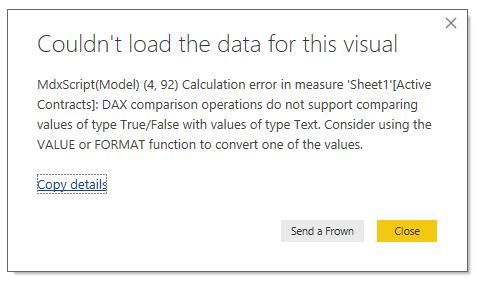
should the 'Status Column' in your measures be the table name? ex: Active Contracts = CALCULATE(COUNT('Sheet1'[Contract Number]), FILTER('Sheet1','Sheet1'[Status]="Active")) 


When I use the table/column name conventions, I'm prompted with this dialogue box:

dialogue.jpg
Anonymous
Not applicable

nevermind, i converted the original column into a text type from True/False on the modeling tab.

Helpful resources

Announcements
Join our Fabric User Panel

Join our Fabric User Panel

Share feedback directly with Fabric product managers, participate in targeted research studies and influence the Fabric roadmap.

February Power BI Update Carousel

Power BI Monthly Update - February 2026

Check out the February 2026 Power BI update to learn about new features.