cancel
Showing results for 
Search instead for 
Did you mean: 

July 7 - July 17 | Round 2 of the Power BI Dataviz World Championships. Don't miss your chance! Learn more

Reply
SMisquith
Frequent Visitor

DAX Query

I have a column "Status" that contains values "completed" and "not completed"

I have a due date column 

Task

StatusDue Date
1

Completed

mm/dd/yyy
2Completedmm/dd/yyy
3Not Completedmm/dd/yyy


I want to visualize sum of all tasks completed/ sum of all tasks due for that month


I've written this query that has too many arguments

Percentage complete = CALCULATE(COUNT(Append1[Status],FILTER(Append1,Append1[Status]="Complete")/SUM(Append1[Completed/Not completed])))
1 ACCEPTED SOLUTION

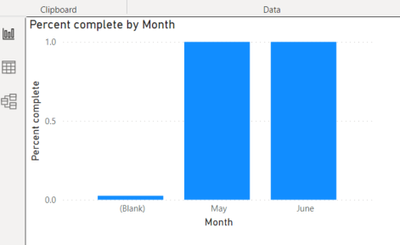
Thank you. The query seems to work, but I am unable to visualize it by due date


SMisquith_1-1624551284801.png


View solution in original post

2 REPLIES 2
Fowmy
Super User
Super User

@SMisquith 

Try this measure please:

Measure = 
DIVIDE(
    CALCULATE(
        COUNTROWS(Table1),
        Table1[Status] = "Completed"
    ),
    COUNTROWS(Table1)
)
Did I answer your question? Mark my post as a solution! and hit thumbs up


Subscribe and learn Power BI from these videos

Website LinkedIn PBI User Group

Thank you. The query seems to work, but I am unable to visualize it by due date


SMisquith_1-1624551284801.png


Helpful resources

Announcements
FabCon and SQLCon Barcelona 2026

FabCon & SQLCon – Barcelona 2026

Join us in Barcelona for FabCon and SQLCon, the Fabric, Power BI, SQL, and AI community event. Save €200 with code FABCMTY200.

60 days of Data Days Carousel

Data Days 2026

Join Data Days 2026: 60 days of free live/on-demand sessions, challenges, study groups, and certification opportunities.

Power BI DataViz World Championships carousel

Power BI DataViz World Championships - June 2026

A new Power BI DataViz World Championship is coming this June! Don't miss out on submitting your entry.

Top Solution Authors