Join us at FabCon Atlanta from March 16 - 20, 2026, for the ultimate Fabric, Power BI, AI and SQL community-led event. Save $200 with code FABCOMM.
Register now!Learn from the best! Meet the four finalists headed to the FINALS of the Power BI Dataviz World Championships! Register now
I have a column "Status" that contains values "completed" and "not completed"
I have a due date column
Task | Status | Due Date |
| 1 | Completed | mm/dd/yyy |
| 2 | Completed | mm/dd/yyy |
| 3 | Not Completed | mm/dd/yyy |
I want to visualize sum of all tasks completed/ sum of all tasks due for that month
I've written this query that has too many arguments
Solved! Go to Solution.
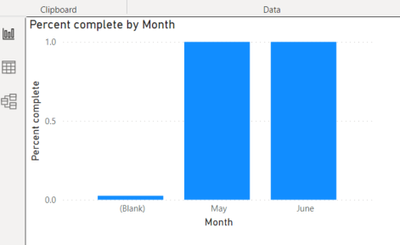
Thank you. The query seems to work, but I am unable to visualize it by due date
@SMisquith
Try this measure please:
Measure =
DIVIDE(
CALCULATE(
COUNTROWS(Table1),
Table1[Status] = "Completed"
),
COUNTROWS(Table1)
)
⭕ Subscribe and learn Power BI from these videos
⚪ Website ⚪ LinkedIn ⚪ PBI User Group
Thank you. The query seems to work, but I am unable to visualize it by due date
Share feedback directly with Fabric product managers, participate in targeted research studies and influence the Fabric roadmap.
Check out the February 2026 Power BI update to learn about new features.
| User | Count |
|---|---|
| 61 | |
| 55 | |
| 39 | |
| 16 | |
| 15 |
| User | Count |
|---|---|
| 93 | |
| 84 | |
| 33 | |
| 31 | |
| 25 |