Don't miss your chance to take exam DP-600 or DP-700 on us!
Request nowLearn from the best! Meet the four finalists headed to the FINALS of the Power BI Dataviz World Championships! Register now
Hi,
I'm looking to create a matrix visual where I have multiple measures on the same row but under a single column of year. I have 2 measures one that calculates total sales, and another that calculates total customers. Due to the structure of the dataset the only option I have is to create a specific measure for each.
I have created 6 measures, 3 that show the sales totals for each of 3 stores and 3 that show the customer totals for each of 3 stores.
I would like to have the matrix structured as follows:
| Year | ||
| Store1 | Sales | Customers |
| Store2 | Sales | Customers |
| Store3 | Sales | Customers |
However, with show on rows the result is this:
| Year | |
| Store1 | Store1 Sales |
| Store1 | Store1 Customers |
| Store2 | Store2 Sales |
| Store2 | Store2 Customers |
| Store3 | Store3 Sales |
| Store3 | Store3 Customers |
I know I'm limited by my dataset and the structure, but is there anyway to get the desired format?
Thanks
Solved! Go to Solution.
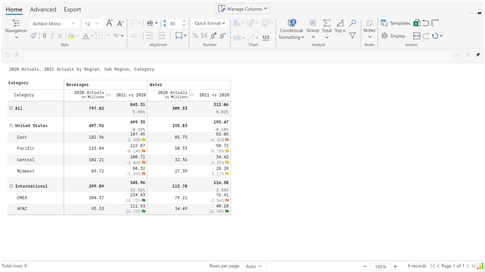
You can merge two measures in a single column visually (either vertically or horizontally) in a single click without any DAX. This can be achieved using Inforiver.
I found an article that helped:
Share feedback directly with Fabric product managers, participate in targeted research studies and influence the Fabric roadmap.
Check out the February 2026 Power BI update to learn about new features.
| User | Count |
|---|---|
| 54 | |
| 47 | |
| 39 | |
| 16 | |
| 15 |
| User | Count |
|---|---|
| 82 | |
| 69 | |
| 39 | |
| 29 | |
| 27 |