cancel
Showing results for 
Search instead for 
Did you mean: 

Learn from the best! Meet the four finalists headed to the FINALS of the Power BI Dataviz World Championships! Register now

Reply
id013
Helper V
Helper V

Custom Table Visual

Hi,

I'm looking to create a matrix visual where I have multiple measures on the same row but under a single column of year. I have 2 measures one that calculates total sales, and another that calculates total customers. Due to the structure of the dataset the only option I have is to create a specific measure for each.  


I have created 6 measures, 3 that show the sales totals for each of 3 stores and 3 that show the customer totals for each of 3 stores.


I would like to have the matrix structured as follows:

 Year
Store1SalesCustomers
Store2SalesCustomers 
Store3SalesCustomers


However, with show on rows the result is this:


 Year
Store1Store1 Sales
Store1Store1 Customers
Store2Store2 Sales
Store2Store2 Customers
Store3Store3 Sales
Store3Store3 Customers


I know I'm limited by my dataset and the structure, but is there anyway to get the desired format? 


Thanks

1 ACCEPTED SOLUTION
2 REPLIES 2
chandravadana
Frequent Visitor

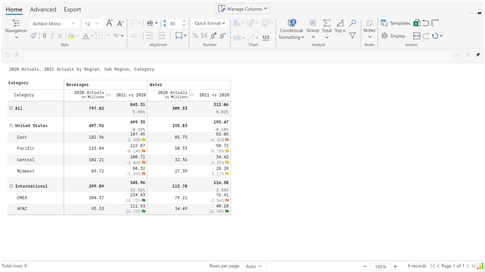
You can merge two measures in a single column visually (either vertically or horizontally) in a single click without any DAX. This can be achieved using Inforiver.


chandravadana_0-1642739570746.png

chandravadana_1-1642739621629.png


id013
Helper V
Helper V

Helpful resources

Announcements
Join our Fabric User Panel

Join our Fabric User Panel

Share feedback directly with Fabric product managers, participate in targeted research studies and influence the Fabric roadmap.

February Power BI Update Carousel

Power BI Monthly Update - February 2026

Check out the February 2026 Power BI update to learn about new features.

FabCon Atlanta 2026 carousel

FabCon Atlanta 2026

Join us at FabCon Atlanta, March 16-20, for the ultimate Fabric, Power BI, AI and SQL community-led event. Save $200 with code FABCOMM.