
cancel
Showing results for 
Search instead for 
Did you mean: 

The Power BI Data Visualization World Championships is back! Get ahead of the game and start preparing now! Learn more

Reply
jean_valadez
New Member

Custom Conditional Formatting with Icons

Hello - I am working on using custom conditional formatting icons for the table as follows:


STATUS                             ICONS

NOT STARTEDRed Diamond
IN PROGRESSYellow Triangle
IN REVIEWYellow Circle
CLEARING COMMENTSExclamation Point in a yellow circle
COMPLETEDCheck mark in a green circle
BLOCKEDX in a Red Circle


I would like my symbol to display on the left of my already existing Status column. How would I go about creating these custom icons for my tasks status?


Thank you,

Jeanette

2 REPLIES 2
Anonymous
Not applicable

Hi @jean_valadez ,


I think you can use conditional formatting in table visual/matrix visual. 

Select [Status] column andapply setting to Icons.

Result is as below.

vrzhoumsft_0-1685600431377.png

For reference:Apply conditional table formatting in Power BI - Power BI | Microsoft Learn


Best Regards,
Rico Zhou


If this post helps, then please consider Accept it as the solution to help the other members find it more quickly.


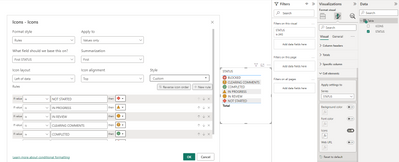
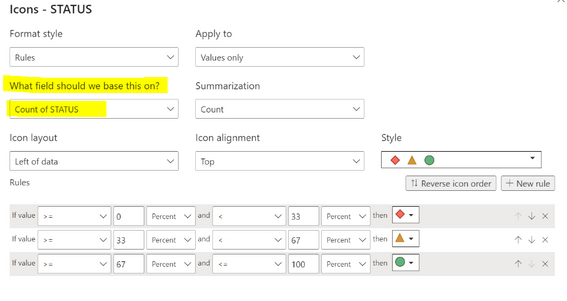
Hi Rico - Thanks for the feedback. That is what I expected the conditonal formatting to let me do however I am not sure if I need to change my Status data under the Column Tools ribbon to another data type. It is currently set as Text/string and I do not get the first COUNT option as you are seeing in your screenshot. Please see below for reference:


jean_valadez_0-1685628144667.png


jean_valadez_1-1685628223909.png

Thank you,

Jeanette


Helpful resources

Announcements
Power BI DataViz World Championships

Power BI Dataviz World Championships

The Power BI Data Visualization World Championships is back! Get ahead of the game and start preparing now!

December 2025 Power BI Update Carousel

Power BI Monthly Update - December 2025

Check out the December 2025 Power BI Holiday Recap!

FabCon Atlanta 2026 carousel

FabCon Atlanta 2026

Join us at FabCon Atlanta, March 16-20, for the ultimate Fabric, Power BI, AI and SQL community-led event. Save $200 with code FABCOMM.

Top Solution Authors