
Join us at FabCon Atlanta from March 16 - 20, 2026, for the ultimate Fabric, Power BI, AI and SQL community-led event. Save $200 with code FABCOMM.
Register now!The Power BI Data Visualization World Championships is back! It's time to submit your entry. Live now!
I have a main table that pulls data from the db. I am using a different table using the same source to use in filter and a third date table where a calculated column formatted in 'mm/dd' is used as column header.
Now the issue is that,
I have selected a date '2023-09-03' in the filter the for that date that is '09/03' it should show "A" as column header for all other dates it should show "B" but it is showing B for all.
Thanks in advance fir the help!
The requirement is not to use it as a filter; but to use it as a second column header (and for that to happen it should come as a calculated column and not a measure)
Hi @Anonymous ,
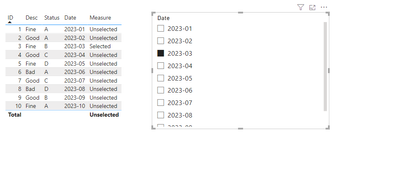
I made simple samples and you can check the results below:
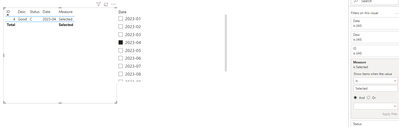
If you need to filter, you can set measure to Selected in the filter
Measure = var _s = SELECTEDVALUE('Table 2'[Date])
RETURN IF(MAX('Table'[Date])=_s,"Selected","Unselected")
Please feel free to correct me and provide more information if I have misunderstood you!
An attachment for your reference. Hope it helps!
Best regards,
Community Support Team_ Scott Chang
If this post helps then please consider Accept it as the solution to help the other members find it more quickly.
That is the requirement; that it should show "A" for the selected value in the filter and for other it should show "B"
"It should show A" - where is that defined?
The Power BI Data Visualization World Championships is back! It's time to submit your entry.
Check out the January 2026 Power BI update to learn about new features.
| User | Count |
|---|---|
| 60 | |
| 47 | |
| 30 | |
| 25 | |
| 23 |
| User | Count |
|---|---|
| 141 | |
| 110 | |
| 65 | |
| 38 | |
| 33 |