
Learn from the best! Meet the four finalists headed to the FINALS of the Power BI Dataviz World Championships! Register now
I have a main table that pulls data from the db. I am using a different table using the same source to use in filter and a third date table where a calculated column formatted in 'mm/dd' is used as column header.
Now the issue is that,
I have selected a date '2023-09-03' in the filter the for that date that is '09/03' it should show "A" as column header for all other dates it should show "B" but it is showing B for all.
Thanks in advance fir the help!
The requirement is not to use it as a filter; but to use it as a second column header (and for that to happen it should come as a calculated column and not a measure)
Hi @Anonymous ,
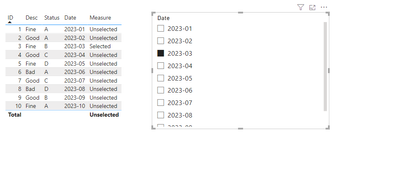
I made simple samples and you can check the results below:
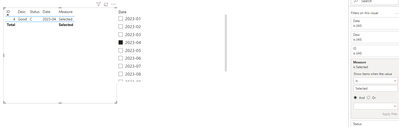
If you need to filter, you can set measure to Selected in the filter
Measure = var _s = SELECTEDVALUE('Table 2'[Date])
RETURN IF(MAX('Table'[Date])=_s,"Selected","Unselected")
Please feel free to correct me and provide more information if I have misunderstood you!
An attachment for your reference. Hope it helps!
Best regards,
Community Support Team_ Scott Chang
If this post helps then please consider Accept it as the solution to help the other members find it more quickly.
That is the requirement; that it should show "A" for the selected value in the filter and for other it should show "B"
"It should show A" - where is that defined?
If you have recently started exploring Fabric, we'd love to hear how it's going. Your feedback can help with product improvements.
A new Power BI DataViz World Championship is coming this June! Don't miss out on submitting your entry.
Share feedback directly with Fabric product managers, participate in targeted research studies and influence the Fabric roadmap.
| User | Count |
|---|---|
| 57 | |
| 34 | |
| 33 | |
| 18 | |
| 16 |
| User | Count |
|---|---|
| 65 | |
| 65 | |
| 44 | |
| 30 | |
| 29 |