
Don't miss your chance to take exam DP-600 or DP-700 on us!
Request nowLearn from the best! Meet the four finalists headed to the FINALS of the Power BI Dataviz World Championships! Register now
I have a main table that pulls data from the db. I am using a different table using the same source to use in filter and a third date table where a calculated column formatted in 'mm/dd' is used as column header.
Now the issue is that,
I have selected a date '2023-09-03' in the filter the for that date that is '09/03' it should show "A" as column header for all other dates it should show "B" but it is showing B for all.
Thanks in advance fir the help!
The requirement is not to use it as a filter; but to use it as a second column header (and for that to happen it should come as a calculated column and not a measure)
Hi @Anonymous ,
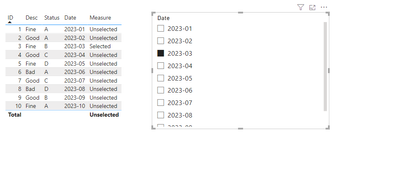
I made simple samples and you can check the results below:
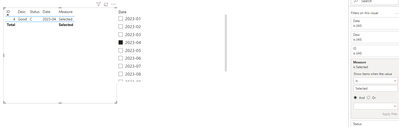
If you need to filter, you can set measure to Selected in the filter
Measure = var _s = SELECTEDVALUE('Table 2'[Date])
RETURN IF(MAX('Table'[Date])=_s,"Selected","Unselected")
Please feel free to correct me and provide more information if I have misunderstood you!
An attachment for your reference. Hope it helps!
Best regards,
Community Support Team_ Scott Chang
If this post helps then please consider Accept it as the solution to help the other members find it more quickly.
That is the requirement; that it should show "A" for the selected value in the filter and for other it should show "B"
"It should show A" - where is that defined?
| User | Count |
|---|---|
| 50 | |
| 40 | |
| 32 | |
| 14 | |
| 13 |
| User | Count |
|---|---|
| 87 | |
| 73 | |
| 37 | |
| 28 | |
| 26 |