Get Fabric or SQL Certified for Free.
Get certified for free when you join Fabric Data Days 2026 and dive into Fabric, Power BI, SQL, AI, and other essential data skills.
Join now- Power BI forums
- Get Help with Power BI
- Desktop
- Service
- Report Server
- Power Query
- Mobile Apps
- Developer
- DAX Commands and Tips
- Custom Visuals Development Discussion
- Health and Life Sciences
- Power BI Spanish forums
- Translated Spanish Desktop
- Training and Consulting
- Instructor Led Training
- Dashboard in a Day for Women, by Women
- Galleries
- Data Stories Gallery
- Themes Gallery
- Contests Gallery
- QuickViz Gallery
- Quick Measures Gallery
- Visual Calculations Gallery
- Notebook Gallery
- Translytical Task Flow Gallery
- TMDL Gallery
- R Script Showcase
- Webinars and Video Gallery
- Ideas
- Custom Visuals Ideas (read-only)
- Issues
- Issues
- Events
- Upcoming Events
Try your skills in the Power BI Dataviz World Championship! Round one ends June 26. Join now
- Power BI forums
- Forums
- Get Help with Power BI
- Desktop
- Creating measure
- Subscribe to RSS Feed
- Mark Topic as New
- Mark Topic as Read
- Float this Topic for Current User
- Bookmark
- Subscribe
- Printer Friendly Page

- Mark as New
- Bookmark
- Subscribe
- Mute
- Subscribe to RSS Feed
- Permalink
- Report Inappropriate Content
Creating measure
How do I return a table excluding all rows where [Revenue] is blank, see example below. Which DAX function?
| Customer | Revenue | Disbursement | DateMonth |
| 1 | 156 | 201701 | |
| 2 | 365 | 18 | 201702 |
| 3 | 32 | 201703 | |
| 3 | 69 | 201704 | |
| 2 | 152 | 54 | 201705 |
| 5 | 325 | 21 | 201706 |
| 4 | 145 | 69 | 201707 |
| 2 | 262 | 58 | 201708 |
| 3 | 45 | 201709 | |
| 6 | 326 | 52 | 201710 |
| 1 | 52 | 201711 | |
| 1 | 123 | 201712 |
Solved! Go to Solution.


- Mark as New
- Bookmark
- Subscribe
- Mute
- Subscribe to RSS Feed
- Permalink
- Report Inappropriate Content
Hi,
This can be done without a DAX formula. In Power Query, one can simply filter the revenue column on >0.
Regards,
Ashish Mathur
http://www.ashishmathur.com
https://www.linkedin.com/in/excelenthusiasts/


- Mark as New
- Bookmark
- Subscribe
- Mute
- Subscribe to RSS Feed
- Permalink
- Report Inappropriate Content
Hi @David_1970
Please try this calculated table
NewTableName =
        FILTER(Table1,
		'Table1'[Revenue]<> BLANK()
		)

- Mark as New
- Bookmark
- Subscribe
- Mute
- Subscribe to RSS Feed
- Permalink
- Report Inappropriate Content
Hi @David_1970,
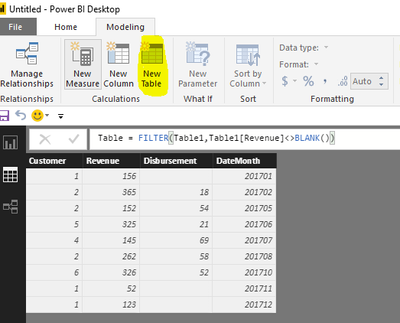
As I tested, the formula @Phil_Seamark posted is right. Please click "New Table" under modeling on Home page(highlighted in yellow background), type the formula, you will get expected result.
Table = FILTER(Table1,Table1[Revenue]<>BLANK())
Best Regards,
Angelia
- Mark as New
- Bookmark
- Subscribe
- Mute
- Subscribe to RSS Feed
- Permalink
- Report Inappropriate Content
Hi @David_1970,
As I tested, the formula @Phil_Seamark posted is right. Please click "New Table" under modeling on Home page(highlighted in yellow background), type the formula, you will get expected result.
Table = FILTER(Table1,Table1[Revenue]<>BLANK())
Best Regards,
Angelia
- Mark as New
- Bookmark
- Subscribe
- Mute
- Subscribe to RSS Feed
- Permalink
- Report Inappropriate Content
Hi @David_1970
Please try this calculated table
NewTableName =
        FILTER(Table1,
		'Table1'[Revenue]<> BLANK()
		)
- Mark as New
- Bookmark
- Subscribe
- Mute
- Subscribe to RSS Feed
- Permalink
- Report Inappropriate Content
Hi,
This can be done without a DAX formula. In Power Query, one can simply filter the revenue column on >0.
Regards,
Ashish Mathur
http://www.ashishmathur.com
https://www.linkedin.com/in/excelenthusiasts/


- Mark as New
- Bookmark
- Subscribe
- Mute
- Subscribe to RSS Feed
- Permalink
- Report Inappropriate Content
NewTableName = SUMMARIZE(
FILTER(Table1,'Table1'[Field1]<> BLANK()),
'Table1'[Field1],
‘Table1’[Field2]
etc.
)

Helpful resources

Data Days 2026
Don't miss out on Data Days, June 15 through August 7. Learn Fabric, Power BI, SQL, AI and more.

Power BI DataViz World Championships - June 2026
A new Power BI DataViz World Championship is coming this June! Don't miss out on submitting your entry.

| User | Count |
|---|---|
| 22 | |
| 22 | |
| 20 | |
| 19 | |
| 11 |


| User | Count |
|---|---|
| 63 | |
| 53 | |
| 46 | |
| 44 | |
| 31 |


