This time we’re going bigger than ever. Fabric, Power BI, SQL, AI and more. We're covering it all. You won't want to miss it.
Learn moreLevel up your Power BI skills this month - build one visual each week and tell better stories with data! Get started
Hello, there is a metric in the world of industry called RIF (Recordable Injury Frequency), which is the count of injuries * 200,000 divided by the sum of workforce hours for the same particular period.
I would like to create a measure that (based on selections), will calculate the RIF.
I have two tables in the attached file. 'Recordable' and 'Hours'. I would like to be able to find the RIF for any particular operating area based on injuries that include "Lost Time", "Medical Aid", "Modified Duty" and "Fatality".
As a side request, I will also be attempting to combine some companies (for example, Group1 and Group2 will be called TeamA) and I would like to find their RIF as well.
Any help with this would be most appreciated.
https://drive.google.com/file/d/149AdW0is2UngroFM0kfXpFQ2wznEf4sJ/view?usp=sharing
Solved! Go to Solution.
HI @patri0t82,
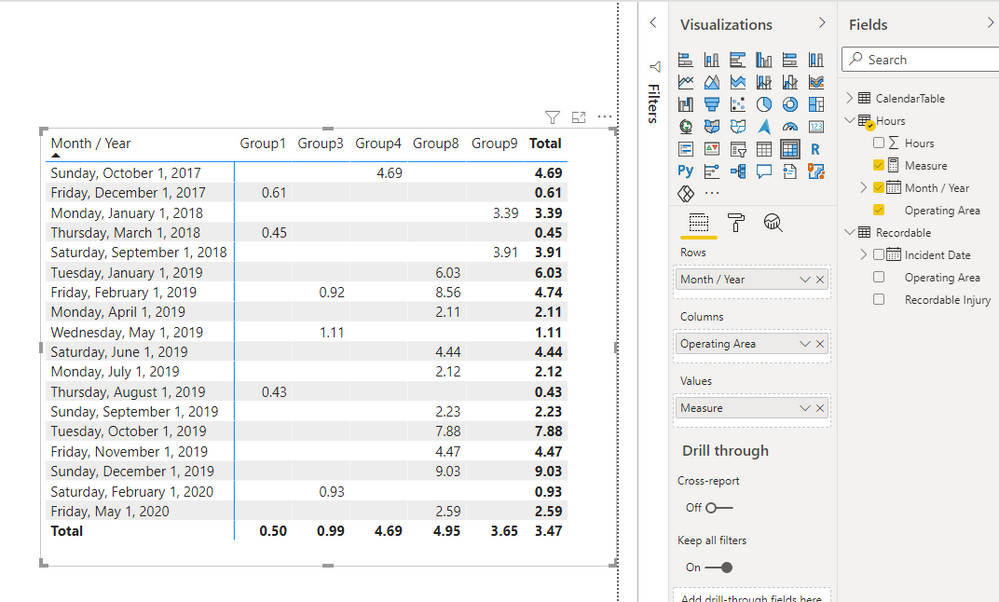
You can try to use the following measure expression if it meets your requirement:
Measure =
VAR summary =
SUMMARIZE (
Hours,
[Month / Year],
[Operating Area],
"workhour", SUM ( Hours[Hours] ),
"injury",
CALCULATE (
COUNT ( Recordable[Recordable Injury] ),
FILTER (
ALLSELECTED ( Recordable ),
Recordable[Recordable Injury] <> ""
&& Recordable[Incident Date] = EARLIER ( Hours[Month / Year] )
&& Recordable[Operating Area] = EARLIER ( Hours[Operating Area] )
)
)
)
RETURN
AVERAGEX ( summary, DIVIDE ( [injury] * 200000, [workhour] ) )
Regards,
Xiaoxin Sheng
HI @patri0t82,
You can try to use the following measure expression if it meets your requirement:
Measure =
VAR summary =
SUMMARIZE (
Hours,
[Month / Year],
[Operating Area],
"workhour", SUM ( Hours[Hours] ),
"injury",
CALCULATE (
COUNT ( Recordable[Recordable Injury] ),
FILTER (
ALLSELECTED ( Recordable ),
Recordable[Recordable Injury] <> ""
&& Recordable[Incident Date] = EARLIER ( Hours[Month / Year] )
&& Recordable[Operating Area] = EARLIER ( Hours[Operating Area] )
)
)
)
RETURN
AVERAGEX ( summary, DIVIDE ( [injury] * 200000, [workhour] ) )
Regards,
Xiaoxin Sheng
I'm so sorry I didn't get back to you sooner. Thank you very much for the solution, it's accomplishing what I hoped it would.
Check out the April 2026 Power BI update to learn about new features.
Sign up to receive a private message when registration opens and key events begin.
If you have recently started exploring Fabric, we'd love to hear how it's going. Your feedback can help with product improvements.
| User | Count |
|---|---|
| 35 | |
| 32 | |
| 26 | |
| 21 | |
| 18 |
| User | Count |
|---|---|
| 68 | |
| 37 | |
| 32 | |
| 25 | |
| 23 |