cancel
Showing results for 
Search instead for 
Did you mean: 

The Power BI Data Visualization World Championships is back! It's time to submit your entry. Live now!

Reply
patri0t82
Post Patron
Post Patron

Creating a Measure - RIF based on Injury Counts and Hours

Hello, there is a metric in the world of industry called RIF (Recordable Injury Frequency), which is the count of injuries * 200,000 divided by the sum of workforce hours for the same particular period.


I would like to create a measure that (based on selections), will calculate the RIF.


I have two tables in the attached file. 'Recordable' and 'Hours'. I would like to be able to find the RIF for any particular operating area based on injuries that include "Lost Time", "Medical Aid", "Modified Duty" and "Fatality".


As a side request, I will also be attempting to combine some companies (for example, Group1 and Group2 will be called TeamA) and I would like to find their RIF as well.


Any help with this would be most appreciated.


https://drive.google.com/file/d/149AdW0is2UngroFM0kfXpFQ2wznEf4sJ/view?usp=sharing 

1 ACCEPTED SOLUTION
Anonymous
Not applicable

HI @patri0t82,

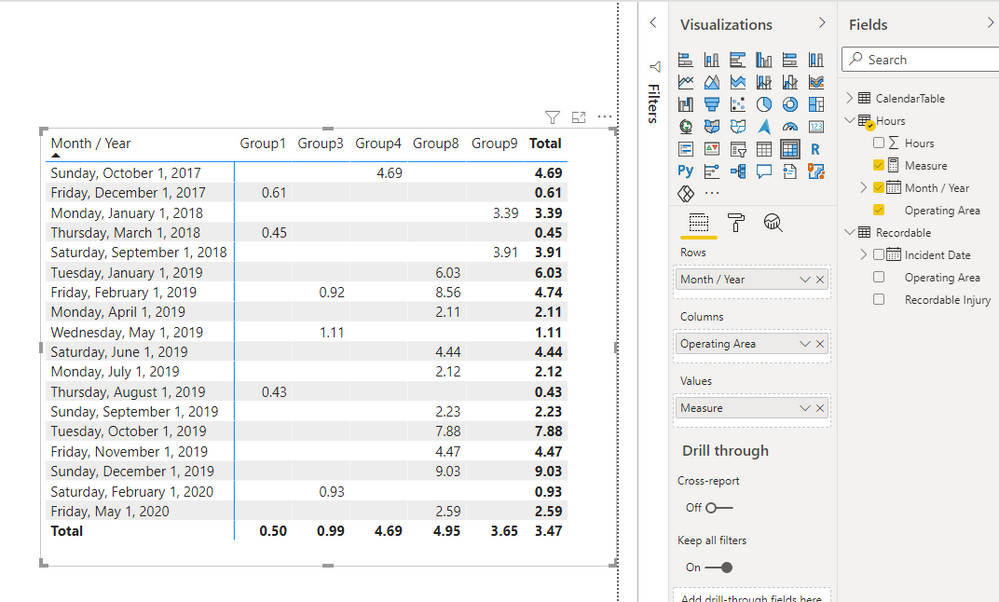
You can try to use the following measure expression if it meets your requirement:


Measure = 
VAR summary =
    SUMMARIZE (
        Hours,
        [Month / Year],
        [Operating Area],
        "workhour", SUM ( Hours[Hours] ),
        "injury",
            CALCULATE (
                COUNT ( Recordable[Recordable Injury] ),
                FILTER (
                    ALLSELECTED ( Recordable ),
                    Recordable[Recordable Injury] <> ""
                        && Recordable[Incident Date] = EARLIER ( Hours[Month / Year] )
                        && Recordable[Operating Area] = EARLIER ( Hours[Operating Area] )
                )
            )
    )
RETURN
    AVERAGEX ( summary, DIVIDE ( [injury] * 200000, [workhour] ) )


4.png

Regards,

Xiaoxin Sheng

View solution in original post

2 REPLIES 2
Anonymous
Not applicable

HI @patri0t82,

You can try to use the following measure expression if it meets your requirement:


Measure = 
VAR summary =
    SUMMARIZE (
        Hours,
        [Month / Year],
        [Operating Area],
        "workhour", SUM ( Hours[Hours] ),
        "injury",
            CALCULATE (
                COUNT ( Recordable[Recordable Injury] ),
                FILTER (
                    ALLSELECTED ( Recordable ),
                    Recordable[Recordable Injury] <> ""
                        && Recordable[Incident Date] = EARLIER ( Hours[Month / Year] )
                        && Recordable[Operating Area] = EARLIER ( Hours[Operating Area] )
                )
            )
    )
RETURN
    AVERAGEX ( summary, DIVIDE ( [injury] * 200000, [workhour] ) )


4.png

Regards,

Xiaoxin Sheng

I'm so sorry I didn't get back to you sooner. Thank you very much for the solution, it's accomplishing what I hoped it would.

Helpful resources

Announcements
December 2025 Power BI Update Carousel

Power BI Monthly Update - December 2025

Check out the December 2025 Power BI Holiday Recap!

FabCon Atlanta 2026 carousel

FabCon Atlanta 2026

Join us at FabCon Atlanta, March 16-20, for the ultimate Fabric, Power BI, AI and SQL community-led event. Save $200 with code FABCOMM.