This is best Fabric, Power BI, SQL and AI community event. How do we know? The last event sold out! Save €200 with code FABCMTY200.
Register nowThe Fabric community is now in read-only for platform upgrade. Learn more
I have a large data set with Date and Status. Status includes Assigned, In Progress and Complete. I want to create a dynamic summary of the count of Complete and Total by Month. The total will be the count of all statuses. Then I can calculate the percentage of how much progress is made in each specific month (Complete divided by Total).
Desired Result of Summary table:
| Month | Complete | Total | % |
| Jan | 0 | 1600 | 0% |
| Feb | 600 | 2700 | 22.22% |
| Mar | 400 | 3000 | 13.33% |
Any suggestions?
P.S. I'm not an advanced user.
Solved! Go to Solution.
@user900 , for the First three columns use Group by of Power Query, and for % create a measure in DAX
Divide(Sum(Table[Complete]), Sum(Table[Total]) )
https://learn.microsoft.com/en-us/power-query/group-by
Hi,
Try this approach
Total = countrows(Data)
Complete = calculate([Total],Data[Status]="Complete")
Complete (%) = divide([Complete],[Total])
Hope this helps.
Hi @user900
Thanks for the solution @amitchandak provided and I want to offer some more information for you to refer to.
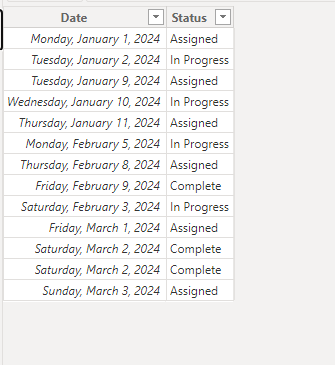
Sample data
Create the following measures
Complete =
VAR a =
CALCULATE ( COUNTROWS ( 'Table' ), 'Table'[Status] = "Complete" )
RETURN
IF ( a > 0, a, IF ( [Total] > 0, 0 ) )
Total = COUNTA('Table'[Status])% = DIVIDE([Complete],[Total])
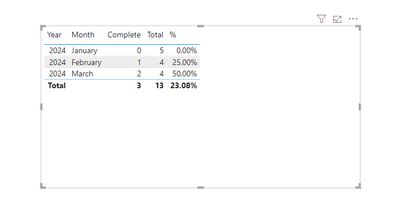
Then put the measures to a table visual.
Output
Best Regards!
Yolo Zhu
If this post helps, then please consider Accept it as the solution to help the other members find it more quickly.
@user900 , for the First three columns use Group by of Power Query, and for % create a measure in DAX
Divide(Sum(Table[Complete]), Sum(Table[Total]) )
Join us in Barcelona for FabCon and SQLCon, the Fabric, Power BI, SQL, and AI community event. Save €200 with code FABCMTY200.
| User | Count |
|---|---|
| 23 | |
| 22 | |
| 14 | |
| 14 | |
| 13 |
| User | Count |
|---|---|
| 47 | |
| 39 | |
| 24 | |
| 20 | |
| 20 |