This time we’re going bigger than ever. Fabric, Power BI, SQL, AI and more. We're covering it all. You won't want to miss it.
Learn moreLevel up your Power BI skills this month - build one visual each week and tell better stories with data! Get started
I have the following structure. 2 tables - Hires and Employee connected by a key.
I would like to create a ratio field = Count of hires / Count of Employee.
I am a Qlikview user moving to PowerBI. In Qlikview i was able to create these expressions in chart or text box. I would like to understand how it is being done in PowerBI
Solved! Go to Solution.
Hi @eiprakash,
You could refer to below fomula:
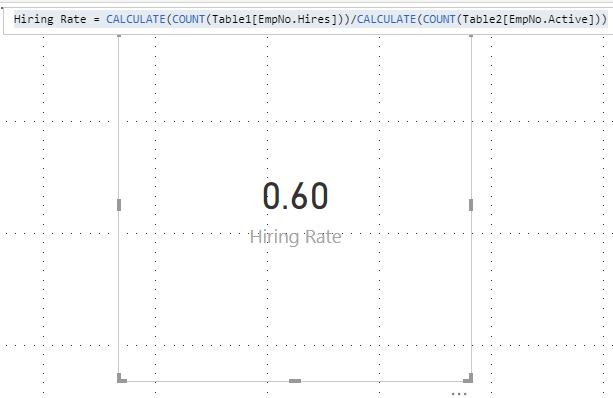
Hiring Rate = CALCULATE(COUNT(Table1[EmpNo.Hires]))/CALCULATE(COUNT(Table2[EmpNo.Active]))
Result:
You can also download the PBIX file to have a view.
https://www.dropbox.com/s/nm5gdnymrb3ma2v/Create%20Measure%20on%20chart.pbix?dl=0
Regards,
Daniel He
Hi @eiprakash,
Could you mean show the formula in the visual? If so, I am afraid you could not achieve this feature currently, but you could add a text box beside the visual:
If I misunderstand you, please let me know as soon as possible.
Regards,
Daniel He
Greatly appreciate your help !!Below would be the Mock up data. Table A and B are connected using the Key Cost Center. I would like to calculate Hiring rate as a measure.
Hiring Rate = Count of EmpNo.Hires (From TableA) / Count of EmpNo.Active(From TableB) = 3/5 (Answer)
Table A:
EmpNo. Hires CostCenter
2 234
3 235
4 236
Table B:
EmpNo. Active CostCenter
5 234
4 235
7 236
9 232
2 231
Hi @eiprakash,
You could refer to below fomula:
Hiring Rate = CALCULATE(COUNT(Table1[EmpNo.Hires]))/CALCULATE(COUNT(Table2[EmpNo.Active]))
Result:
You can also download the PBIX file to have a view.
https://www.dropbox.com/s/nm5gdnymrb3ma2v/Create%20Measure%20on%20chart.pbix?dl=0
Regards,
Daniel He
Thanks much
@Anonymous check this out
Hi,
Can you give some sample mocked-up data of your tables...and the key name using which they are connected
Check out the April 2026 Power BI update to learn about new features.
Sign up to receive a private message when registration opens and key events begin.
If you have recently started exploring Fabric, we'd love to hear how it's going. Your feedback can help with product improvements.
| User | Count |
|---|---|
| 37 | |
| 29 | |
| 29 | |
| 21 | |
| 18 |
| User | Count |
|---|---|
| 71 | |
| 43 | |
| 33 | |
| 24 | |
| 23 |