Join us in Barcelona for FabCon and SQLCon, September 28 - October 1, 2026.
This is best Fabric, Power BI, SQL and AI community event. How do we know? The last event sold out! Save €200 with code FABCMTY200.
Register now- Power BI forums
- Get Help with Power BI
- Desktop
- Service
- Report Server
- Power Query
- Mobile Apps
- Developer
- DAX Commands and Tips
- Custom Visuals Development Discussion
- Health and Life Sciences
- Power BI Spanish forums
- Translated Spanish Desktop
- Training and Consulting
- Instructor Led Training
- Dashboard in a Day for Women, by Women
- Galleries
- Data Stories Gallery
- Themes Gallery
- Contests Gallery
- QuickViz Gallery
- Quick Measures Gallery
- Visual Calculations Gallery
- Fabric Apps Gallery
- Notebook Gallery
- Translytical Task Flow Gallery
- TMDL Gallery
- R Script Showcase
- Webinars and Video Gallery
- Ideas
- Custom Visuals Ideas (read-only)
- Issues
- Issues
- Events
- Upcoming Events
The Fabric community is now in read-only for platform upgrade. Learn more
- Power BI forums
- Forums
- Get Help with Power BI
- Desktop
- Create Measure on chart
- Subscribe to RSS Feed
- Mark Topic as New
- Mark Topic as Read
- Float this Topic for Current User
- Bookmark
- Subscribe
- Printer Friendly Page

- Mark as New
- Bookmark
- Subscribe
- Mute
- Subscribe to RSS Feed
- Permalink
Create Measure on chart
I have the following structure. 2 tables - Hires and Employee connected by a key.
I would like to create a ratio field = Count of hires / Count of Employee.
I am a Qlikview user moving to PowerBI. In Qlikview i was able to create these expressions in chart or text box. I would like to understand how it is being done in PowerBI
Solved! Go to Solution.


- Mark as New
- Bookmark
- Subscribe
- Mute
- Subscribe to RSS Feed
- Permalink
Hi @eiprakash,
You could refer to below fomula:
Hiring Rate = CALCULATE(COUNT(Table1[EmpNo.Hires]))/CALCULATE(COUNT(Table2[EmpNo.Active]))
Result:
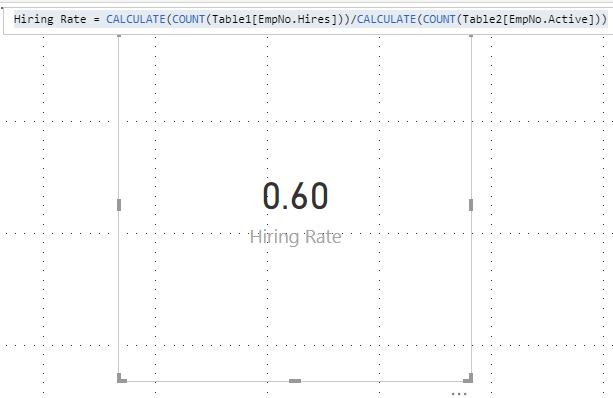
You can also download the PBIX file to have a view.
https://www.dropbox.com/s/nm5gdnymrb3ma2v/Create%20Measure%20on%20chart.pbix?dl=0
Regards,
Daniel He
If this post helps, then please consider Accept it as the solution to help the other members find it more quickly.
- Mark as New
- Bookmark
- Subscribe
- Mute
- Subscribe to RSS Feed
- Permalink
Hi @eiprakash,
Could you mean show the formula in the visual? If so, I am afraid you could not achieve this feature currently, but you could add a text box beside the visual:

If I misunderstand you, please let me know as soon as possible.
Regards,
Daniel He
If this post helps, then please consider Accept it as the solution to help the other members find it more quickly.
- Mark as New
- Bookmark
- Subscribe
- Mute
- Subscribe to RSS Feed
- Permalink
Greatly appreciate your help !!Below would be the Mock up data. Table A and B are connected using the Key Cost Center. I would like to calculate Hiring rate as a measure.
Hiring Rate = Count of EmpNo.Hires (From TableA) / Count of EmpNo.Active(From TableB) = 3/5 (Answer)
Table A:
EmpNo. Hires CostCenter
2 234
3 235
4 236
Table B:
EmpNo. Active CostCenter
5 234
4 235
7 236
9 232
2 231
- Mark as New
- Bookmark
- Subscribe
- Mute
- Subscribe to RSS Feed
- Permalink
Hi @eiprakash,
You could refer to below fomula:
Hiring Rate = CALCULATE(COUNT(Table1[EmpNo.Hires]))/CALCULATE(COUNT(Table2[EmpNo.Active]))
Result:
You can also download the PBIX file to have a view.
https://www.dropbox.com/s/nm5gdnymrb3ma2v/Create%20Measure%20on%20chart.pbix?dl=0
Regards,
Daniel He
If this post helps, then please consider Accept it as the solution to help the other members find it more quickly.
- Mark as New
- Bookmark
- Subscribe
- Mute
- Subscribe to RSS Feed
- Permalink
Thanks much
- Mark as New
- Bookmark
- Subscribe
- Mute
- Subscribe to RSS Feed
- Permalink
@Anonymous check this out


Helpful resources

FabCon & SQLCon – Barcelona 2026
Join us in Barcelona for FabCon and SQLCon, the Fabric, Power BI, SQL, and AI community event. Save €200 with code FABCMTY200.

Power BI DataViz World Championships - June 2026
A new Power BI DataViz World Championship is coming this June! Don't miss out on submitting your entry.

| User | Count |
|---|---|
| 21 | |
| 21 | |
| 14 | |
| 14 | |
| 13 |


| User | Count |
|---|---|
| 47 | |
| 35 | |
| 24 | |
| 20 | |
| 19 |


