Get certified for free when you join Fabric Data Days 2026 and dive into Fabric, Power BI, SQL, AI, and other essential data skills.
Join nowJuly 7 - July 17 | Round 2 of the Power BI Dataviz World Championships. Don't miss your chance! Learn more
Hi PBI gurus,
I have one table of data called Table with two columns "Product" and "Volume". I have performed top 5 Rankx calculation which works fine. I now want to countrows based on Rankx result and return either top 5 or top 4 depending on the number of results from Top5 Measure. For example the Top5 measure result returns 9 results, I want to put a condition if it returns <=5 results I want to return Top5 measure, if not I want return Top4 so <=4.
I believe this would need a countrows added to the Rankx calculation but struggling to combine the two.
Top 5 Measure;
| Product | Top5 |
| J | 1 |
| N | 2 |
| G | 3 |
| I | 3 |
| E | 4 |
| A | 5 |
| B | 5 |
| K | 5 |
| M | 5 |
Result wanted as Top 5 return 9 results (revert to top4)
| Product | Top5 |
| J | 1 |
| N | 2 |
| G | 3 |
| I | 3 |
| E | 4 |
Data Table
|
Solved! Go to Solution.
you can try this
Measure 2 =
VAR _tbl=SUMMARIZE(ALL('Table'),'Table'[Product],"value",sum('Table'[Volume]))
VAR _tbl2=ADDCOLUMNS(_tbl,"rank",rankx(_tbl,[value],,DESC,Dense))
VAR _count=COUNTROWS(FILTER(_tbl2,[rank]<=5))
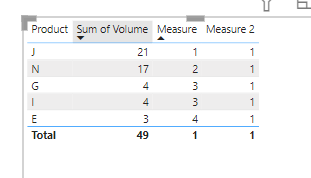
return If(_count>5,IF([Measure]<5,1))
and add measure 2 to filter
pls see the attachment below
Proud to be a Super User!
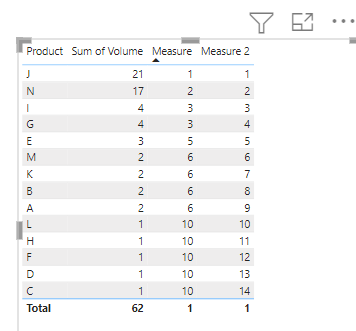
here is a workaround for you
Measure = rankx(all('Table'[Product]),CALCULATE(sum('Table'[Volume])),,DESC)+rankx(all('Table'[Product]),CALCULATE(max('Table'[Product])),,DESC)/100
Measure 2 = rankx(all('Table'[Product]),[Measure],,ASC)
Proud to be a Super User!
Thanks for your reply. Based on my requirements I'm not after a tie break splitter, but rather logic if top 5 results in more than 5 results revert to top 4. Only way I could see to do this is by countrows logic on the Rankx
you can try this
Measure 2 =
VAR _tbl=SUMMARIZE(ALL('Table'),'Table'[Product],"value",sum('Table'[Volume]))
VAR _tbl2=ADDCOLUMNS(_tbl,"rank",rankx(_tbl,[value],,DESC,Dense))
VAR _count=COUNTROWS(FILTER(_tbl2,[rank]<=5))
return If(_count>5,IF([Measure]<5,1))
and add measure 2 to filter
pls see the attachment below
Proud to be a Super User!
This worked. I thought the solution involved creating virtual tables, but couldn't get them to work.
Thanks legend!!!
you are welcome
Proud to be a Super User!
Join us in Barcelona for FabCon and SQLCon, the Fabric, Power BI, SQL, and AI community event. Save €200 with code FABCMTY200.
Join Fabric Data Days 2026: 60 days of free live/on-demand sessions, challenges, study groups, and certification opportunities.
| User | Count |
|---|---|
| 22 | |
| 22 | |
| 18 | |
| 17 | |
| 13 |
| User | Count |
|---|---|
| 61 | |
| 52 | |
| 47 | |
| 41 | |
| 38 |