This time we’re going bigger than ever. Fabric, Power BI, SQL, AI and more. We're covering it all. You won't want to miss it.
Learn moreLevel up your Power BI skills this month - build one visual each week and tell better stories with data! Get started
Hi PBI gurus,
I have one table of data called Table with two columns "Product" and "Volume". I have performed top 5 Rankx calculation which works fine. I now want to countrows based on Rankx result and return either top 5 or top 4 depending on the number of results from Top5 Measure. For example the Top5 measure result returns 9 results, I want to put a condition if it returns <=5 results I want to return Top5 measure, if not I want return Top4 so <=4.
I believe this would need a countrows added to the Rankx calculation but struggling to combine the two.
Top 5 Measure;
| Product | Top5 |
| J | 1 |
| N | 2 |
| G | 3 |
| I | 3 |
| E | 4 |
| A | 5 |
| B | 5 |
| K | 5 |
| M | 5 |
Result wanted as Top 5 return 9 results (revert to top4)
| Product | Top5 |
| J | 1 |
| N | 2 |
| G | 3 |
| I | 3 |
| E | 4 |
Data Table
|
Solved! Go to Solution.
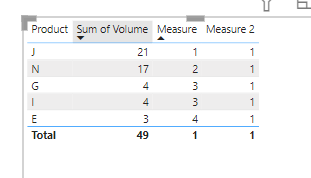
you can try this
Measure 2 =
VAR _tbl=SUMMARIZE(ALL('Table'),'Table'[Product],"value",sum('Table'[Volume]))
VAR _tbl2=ADDCOLUMNS(_tbl,"rank",rankx(_tbl,[value],,DESC,Dense))
VAR _count=COUNTROWS(FILTER(_tbl2,[rank]<=5))
return If(_count>5,IF([Measure]<5,1))
and add measure 2 to filter
pls see the attachment below
Proud to be a Super User!
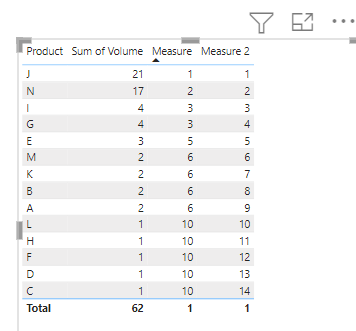
here is a workaround for you
Measure = rankx(all('Table'[Product]),CALCULATE(sum('Table'[Volume])),,DESC)+rankx(all('Table'[Product]),CALCULATE(max('Table'[Product])),,DESC)/100
Measure 2 = rankx(all('Table'[Product]),[Measure],,ASC)
Proud to be a Super User!
Thanks for your reply. Based on my requirements I'm not after a tie break splitter, but rather logic if top 5 results in more than 5 results revert to top 4. Only way I could see to do this is by countrows logic on the Rankx
you can try this
Measure 2 =
VAR _tbl=SUMMARIZE(ALL('Table'),'Table'[Product],"value",sum('Table'[Volume]))
VAR _tbl2=ADDCOLUMNS(_tbl,"rank",rankx(_tbl,[value],,DESC,Dense))
VAR _count=COUNTROWS(FILTER(_tbl2,[rank]<=5))
return If(_count>5,IF([Measure]<5,1))
and add measure 2 to filter
pls see the attachment below
Proud to be a Super User!
This worked. I thought the solution involved creating virtual tables, but couldn't get them to work.
Thanks legend!!!
you are welcome
Proud to be a Super User!
Check out the April 2026 Power BI update to learn about new features.
Sign up to receive a private message when registration opens and key events begin.
If you have recently started exploring Fabric, we'd love to hear how it's going. Your feedback can help with product improvements.
| User | Count |
|---|---|
| 34 | |
| 29 | |
| 29 | |
| 21 | |
| 18 |
| User | Count |
|---|---|
| 68 | |
| 45 | |
| 33 | |
| 24 | |
| 23 |