cancel
Showing results for 
Search instead for 
Did you mean: 

The Power BI Data Visualization World Championships is back! Get ahead of the game and start preparing now! Learn more

Reply
Meryam
New Member

Control Chart - All data

Hello,


I would like to create a control chart with the PBI.

My data are temperatures measurmrnts  according to the date.

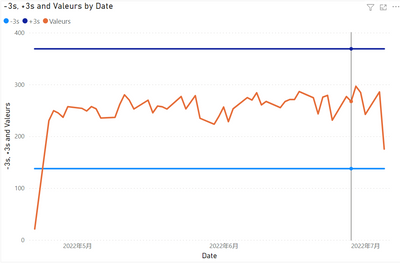
I succeeded in creating the maximum line +3s and the minimum line -3s.

But the problem is that i can't get all the point on the chat (x=temperature).

1.png


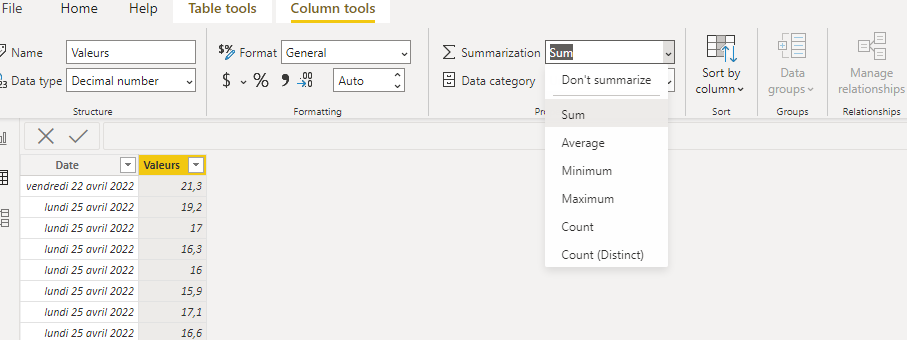
PBI propose to plot the sum, the min, the max, the mediane...etc.

2.png


I triered to modify in the "Data" tab and put don't summarize in place of sum but nothing changes.

3.png


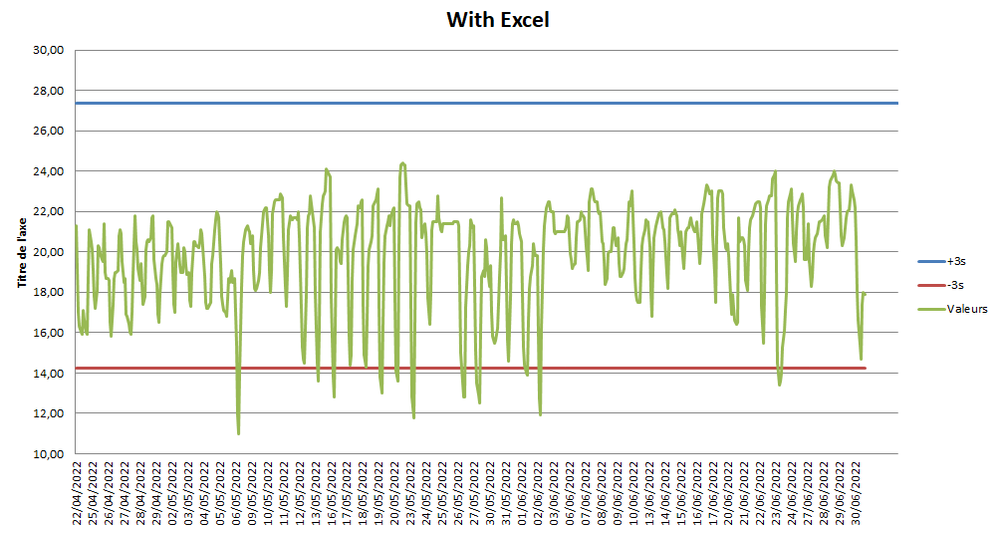
I did the test with Excel ans i get the disired result, but with PBI i can't get it.

Please find here my BI file: https://www.dropbox.com/s/tdh1w0mywp78h12/Test%20PBI.pbix?dl=0 


I think you for your help.

1 ACCEPTED SOLUTION
v-yalanwu-msft
Community Support
Community Support

Hi, @Meryam ;

Try to modify it,

STD = //CALCULATE(STDEV.S(Feuil1[Valeurs]),REMOVEFILTERS(Feuil1[Date ]))
VAR _TABLE=SUMMARIZE(ALL('Feuil1'),[Date ],"1",SUM([Valeurs]))
return STDEVX.S(_TABLE,[1])
Mean = DIVIDE( CALCULATE(SUM([Valeurs]),ALL(Feuil1)),CALCULATE(DISTINCTCOUNT('Feuil1'[Date ]),ALL(Feuil1)))

The final show:

vyalanwumsft_0-1658310732469.png


Best Regards,
Community Support Team _ Yalan Wu
If this post helps, then please consider Accept it as the solution to help the other members find it more quickly.

View solution in original post

3 REPLIES 3
v-yalanwu-msft
Community Support
Community Support

Hi, @Meryam ;

Try to modify it,

STD = //CALCULATE(STDEV.S(Feuil1[Valeurs]),REMOVEFILTERS(Feuil1[Date ]))
VAR _TABLE=SUMMARIZE(ALL('Feuil1'),[Date ],"1",SUM([Valeurs]))
return STDEVX.S(_TABLE,[1])
Mean = DIVIDE( CALCULATE(SUM([Valeurs]),ALL(Feuil1)),CALCULATE(DISTINCTCOUNT('Feuil1'[Date ]),ALL(Feuil1)))

The final show:

vyalanwumsft_0-1658310732469.png


Best Regards,
Community Support Team _ Yalan Wu
If this post helps, then please consider Accept it as the solution to help the other members find it more quickly.

Meryam
New Member

Test with Excel, i want the same graphic on PBI

4.png

@Meryam , Create measures like these and use that in y-axis constant line using analytics pane


M1 = maxx(allselected(Table), Table[temperature]) +3


M1 = minx(allselected(Table), Table[temperature]) - 3

Share with Power BI Enthusiasts: Full Power BI Video (20 Hours) YouTube
Microsoft Fabric Series 60+ Videos YouTube
Microsoft Fabric Hindi End to End YouTube

Helpful resources

Announcements
Power BI DataViz World Championships

Power BI Dataviz World Championships

The Power BI Data Visualization World Championships is back! Get ahead of the game and start preparing now!

December 2025 Power BI Update Carousel

Power BI Monthly Update - December 2025

Check out the December 2025 Power BI Holiday Recap!

FabCon Atlanta 2026 carousel

FabCon Atlanta 2026

Join us at FabCon Atlanta, March 16-20, for the ultimate Fabric, Power BI, AI and SQL community-led event. Save $200 with code FABCOMM.