Get certified for free when you join Fabric Data Days 2026 and dive into Fabric, Power BI, SQL, AI, and other essential data skills.
Join nowData Days is here! Join us now for 60+ days of learning, challenges, and connection. Learn more
Hello,
I would like to create a control chart with the PBI.
My data are temperatures measurmrnts according to the date.
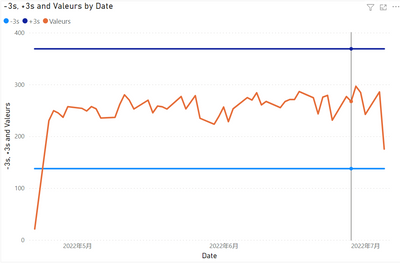
I succeeded in creating the maximum line +3s and the minimum line -3s.
But the problem is that i can't get all the point on the chat (x=temperature).
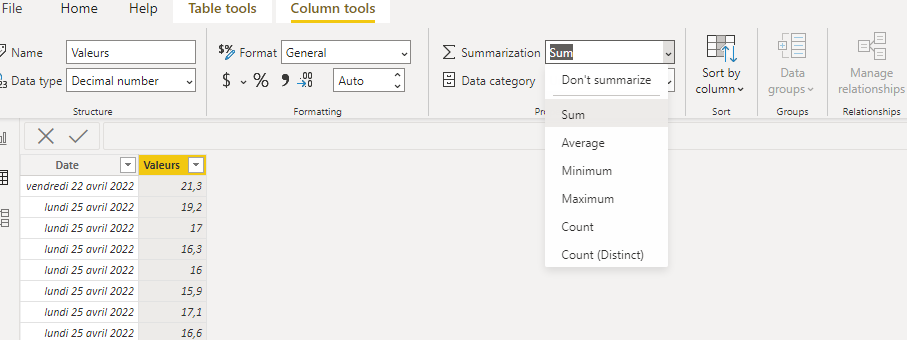
PBI propose to plot the sum, the min, the max, the mediane...etc.
I triered to modify in the "Data" tab and put don't summarize in place of sum but nothing changes.
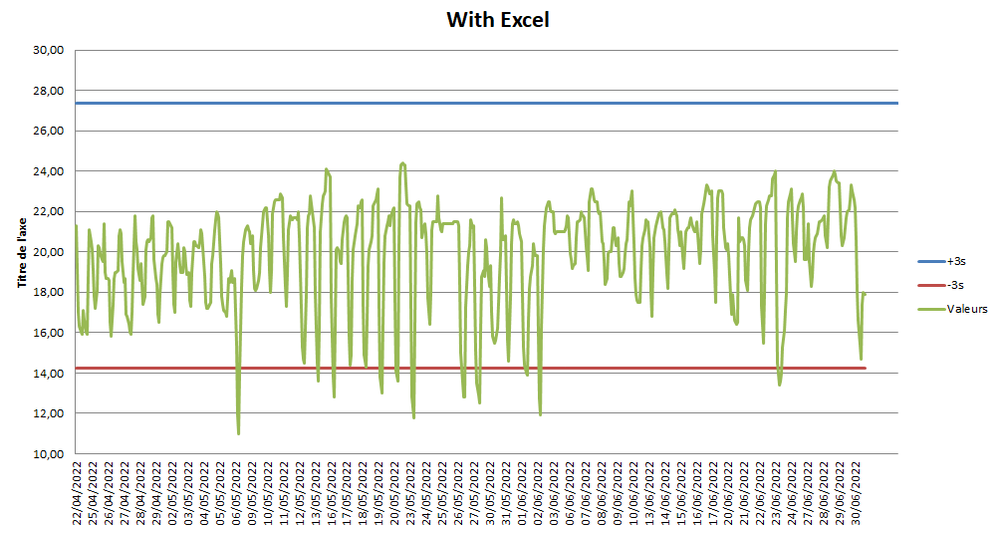
I did the test with Excel ans i get the disired result, but with PBI i can't get it.
Please find here my BI file: https://www.dropbox.com/s/tdh1w0mywp78h12/Test%20PBI.pbix?dl=0
I think you for your help.
Solved! Go to Solution.
Hi, @Meryam ;
Try to modify it,
STD = //CALCULATE(STDEV.S(Feuil1[Valeurs]),REMOVEFILTERS(Feuil1[Date ]))
VAR _TABLE=SUMMARIZE(ALL('Feuil1'),[Date ],"1",SUM([Valeurs]))
return STDEVX.S(_TABLE,[1])Mean = DIVIDE( CALCULATE(SUM([Valeurs]),ALL(Feuil1)),CALCULATE(DISTINCTCOUNT('Feuil1'[Date ]),ALL(Feuil1)))
The final show:
Best Regards,
Community Support Team _ Yalan Wu
If this post helps, then please consider Accept it as the solution to help the other members find it more quickly.
Hi, @Meryam ;
Try to modify it,
STD = //CALCULATE(STDEV.S(Feuil1[Valeurs]),REMOVEFILTERS(Feuil1[Date ]))
VAR _TABLE=SUMMARIZE(ALL('Feuil1'),[Date ],"1",SUM([Valeurs]))
return STDEVX.S(_TABLE,[1])Mean = DIVIDE( CALCULATE(SUM([Valeurs]),ALL(Feuil1)),CALCULATE(DISTINCTCOUNT('Feuil1'[Date ]),ALL(Feuil1)))
The final show:
Best Regards,
Community Support Team _ Yalan Wu
If this post helps, then please consider Accept it as the solution to help the other members find it more quickly.
Test with Excel, i want the same graphic on PBI
@Meryam , Create measures like these and use that in y-axis constant line using analytics pane
M1 = maxx(allselected(Table), Table[temperature]) +3
M1 = minx(allselected(Table), Table[temperature]) - 3
Don't miss out on Data Days, June 15 through August 7. Learn Fabric, Power BI, SQL, AI and more.
Check out the May 2026 Power BI update to learn about new features.
| User | Count |
|---|---|
| 23 | |
| 23 | |
| 21 | |
| 17 | |
| 14 |
| User | Count |
|---|---|
| 58 | |
| 50 | |
| 37 | |
| 29 | |
| 24 |