cancel
Showing results for 
Search instead for 
Did you mean: 

The Power BI Data Visualization World Championships is back! It's time to submit your entry. Live now!

Reply
Meryam
New Member

Control Chart - All data

Hello,


I would like to create a control chart with the PBI.

My data are temperatures measurmrnts  according to the date.

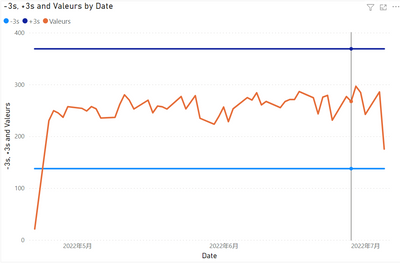
I succeeded in creating the maximum line +3s and the minimum line -3s.

But the problem is that i can't get all the point on the chat (x=temperature).

1.png


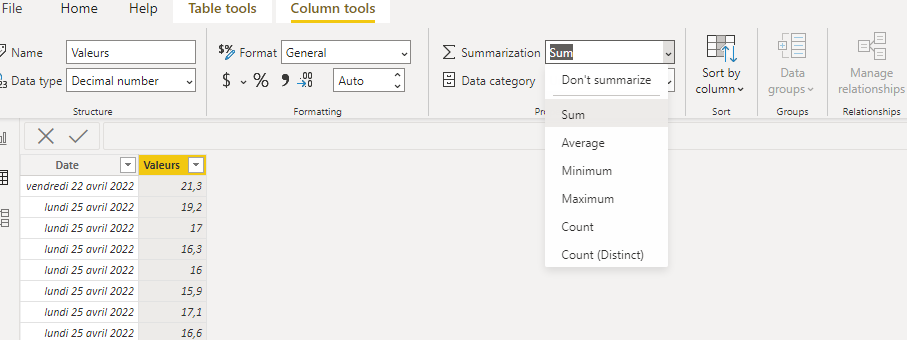
PBI propose to plot the sum, the min, the max, the mediane...etc.

2.png


I triered to modify in the "Data" tab and put don't summarize in place of sum but nothing changes.

3.png


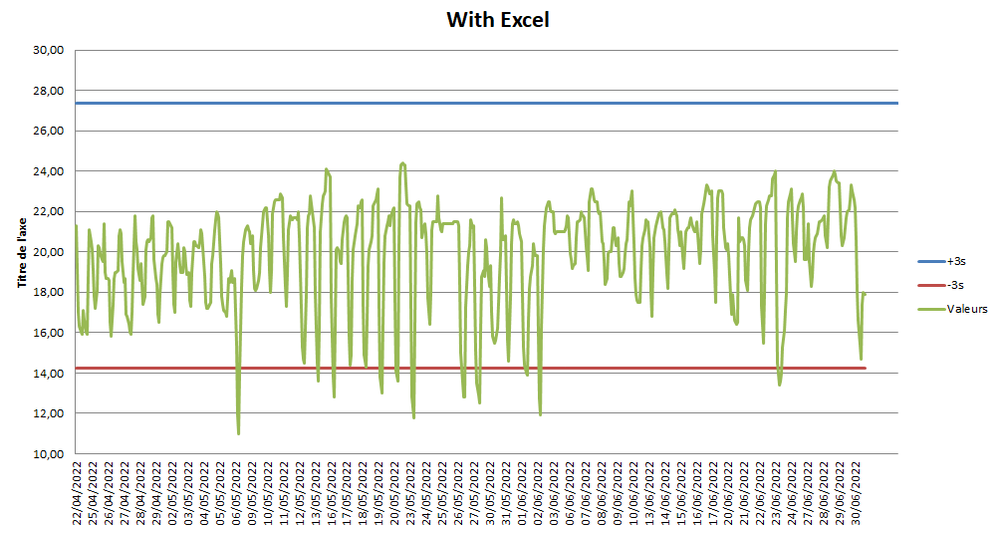
I did the test with Excel ans i get the disired result, but with PBI i can't get it.

Please find here my BI file: https://www.dropbox.com/s/tdh1w0mywp78h12/Test%20PBI.pbix?dl=0 


I think you for your help.

1 ACCEPTED SOLUTION
v-yalanwu-msft
Community Support
Community Support

Hi, @Meryam ;

Try to modify it,

STD = //CALCULATE(STDEV.S(Feuil1[Valeurs]),REMOVEFILTERS(Feuil1[Date ]))
VAR _TABLE=SUMMARIZE(ALL('Feuil1'),[Date ],"1",SUM([Valeurs]))
return STDEVX.S(_TABLE,[1])
Mean = DIVIDE( CALCULATE(SUM([Valeurs]),ALL(Feuil1)),CALCULATE(DISTINCTCOUNT('Feuil1'[Date ]),ALL(Feuil1)))

The final show:

vyalanwumsft_0-1658310732469.png


Best Regards,
Community Support Team _ Yalan Wu
If this post helps, then please consider Accept it as the solution to help the other members find it more quickly.

View solution in original post

3 REPLIES 3
v-yalanwu-msft
Community Support
Community Support

Hi, @Meryam ;

Try to modify it,

STD = //CALCULATE(STDEV.S(Feuil1[Valeurs]),REMOVEFILTERS(Feuil1[Date ]))
VAR _TABLE=SUMMARIZE(ALL('Feuil1'),[Date ],"1",SUM([Valeurs]))
return STDEVX.S(_TABLE,[1])
Mean = DIVIDE( CALCULATE(SUM([Valeurs]),ALL(Feuil1)),CALCULATE(DISTINCTCOUNT('Feuil1'[Date ]),ALL(Feuil1)))

The final show:

vyalanwumsft_0-1658310732469.png


Best Regards,
Community Support Team _ Yalan Wu
If this post helps, then please consider Accept it as the solution to help the other members find it more quickly.

Meryam
New Member

Test with Excel, i want the same graphic on PBI

4.png

@Meryam , Create measures like these and use that in y-axis constant line using analytics pane


M1 = maxx(allselected(Table), Table[temperature]) +3


M1 = minx(allselected(Table), Table[temperature]) - 3

Share with Power BI Enthusiasts: Full Power BI Video (20 Hours) YouTube
Microsoft Fabric Series 60+ Videos YouTube
Microsoft Fabric Hindi End to End YouTube

Helpful resources

Announcements
December 2025 Power BI Update Carousel

Power BI Monthly Update - December 2025

Check out the December 2025 Power BI Holiday Recap!

FabCon Atlanta 2026 carousel

FabCon Atlanta 2026

Join us at FabCon Atlanta, March 16-20, for the ultimate Fabric, Power BI, AI and SQL community-led event. Save $200 with code FABCOMM.