Get certified for free when you join Fabric Data Days 2026 and dive into Fabric, Power BI, SQL, AI, and other essential data skills.
Join nowJuly 7 - July 17 | Round 2 of the Power BI Dataviz World Championships. Don't miss your chance! Learn more
Hello everyone,
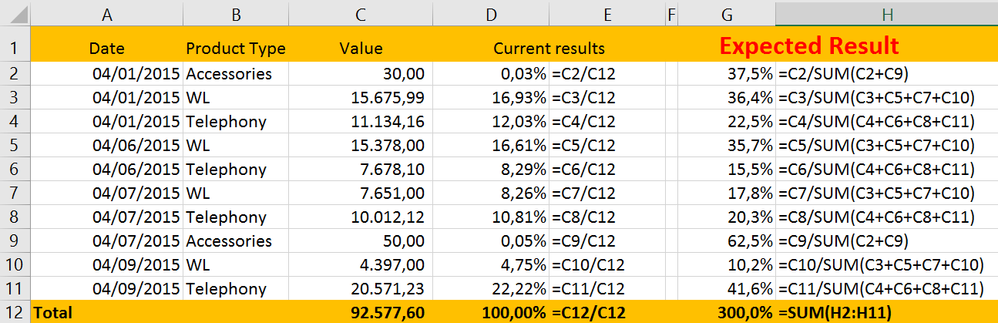
need to get the percentage value that represents each day within the month by product type using dax formula(s). E.g.:
Sample:
| Date | Product Type | Value |
| 04/01/2015 | Accessories | 30,00 |
| 04/01/2015 | WL | 15.675,99 |
| 04/01/2015 | Telephony | 11.134,16 |
| 04/06/2015 | WL | 15.378,00 |
| 04/06/2015 | Telephony | 7.678,10 |
| 04/07/2015 | WL | 7.651,00 |
| 04/07/2015 | Telephony | 10.012,12 |
| 04/07/2015 | Accessories | 50,00 |
| 04/09/2015 | WL | 4.397,00 |
| 04/09/2015 | Telephony | 20.571,23 |
| Total | 92.577,60 |
I hope I have been clear in my problem. Thank you for your attention.
Solved! Go to Solution.
Hi Paulompm,
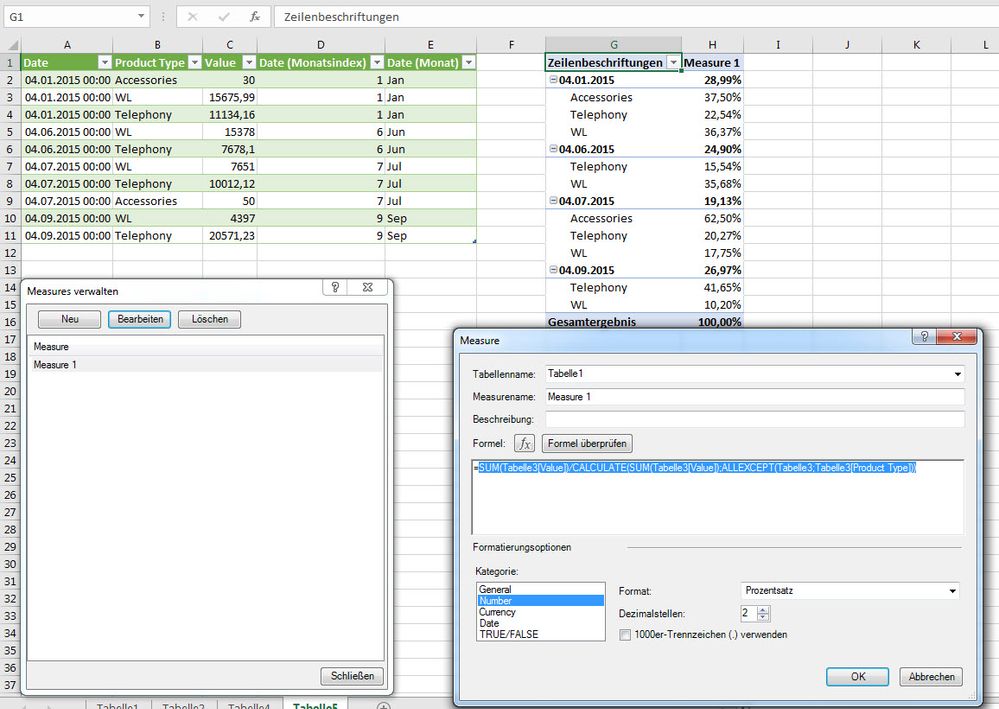
I think this measure would give you your result you wish to have.
Hi, try with this:
%ByDay =
SUMX (
Table1,
DIVIDE (
CALCULATE ( SUM ( Table1[Value] ) ),
CALCULATE ( SUM ( Table1[Value] ), ALLEXCEPT ( Table1,Table1[Product Type] ) )
)
)
Hi, try with this:
%ByDay =
SUMX (
Table1,
DIVIDE (
CALCULATE ( SUM ( Table1[Value] ) ),
CALCULATE ( SUM ( Table1[Value] ), ALLEXCEPT ( Table1,Table1[Product Type] ) )
)
)
Hi Paulompm,
I think this measure would give you your result you wish to have.
actually it isn't working very well this measure. I have data for several years and I think the ALLEXCEPT Is mixing the years or month or both. I should get much higher percentage values.
Join us in Barcelona for FabCon and SQLCon, the Fabric, Power BI, SQL, and AI community event. Save €200 with code FABCMTY200.
Join Fabric Data Days 2026: 60 days of free live/on-demand sessions, challenges, study groups, and certification opportunities.
| User | Count |
|---|---|
| 22 | |
| 18 | |
| 18 | |
| 17 | |
| 13 |
| User | Count |
|---|---|
| 61 | |
| 53 | |
| 47 | |
| 40 | |
| 38 |