This time we’re going bigger than ever. Fabric, Power BI, SQL, AI and more. We're covering it all. You won't want to miss it.
Learn moreLevel up your Power BI skills this month - build one visual each week and tell better stories with data! Get started
Hello everyone,
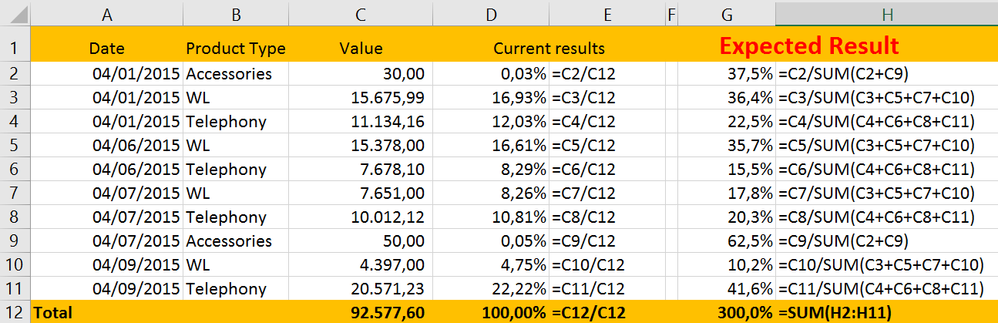
need to get the percentage value that represents each day within the month by product type using dax formula(s). E.g.:
Sample:
| Date | Product Type | Value |
| 04/01/2015 | Accessories | 30,00 |
| 04/01/2015 | WL | 15.675,99 |
| 04/01/2015 | Telephony | 11.134,16 |
| 04/06/2015 | WL | 15.378,00 |
| 04/06/2015 | Telephony | 7.678,10 |
| 04/07/2015 | WL | 7.651,00 |
| 04/07/2015 | Telephony | 10.012,12 |
| 04/07/2015 | Accessories | 50,00 |
| 04/09/2015 | WL | 4.397,00 |
| 04/09/2015 | Telephony | 20.571,23 |
| Total | 92.577,60 |
I hope I have been clear in my problem. Thank you for your attention.
Solved! Go to Solution.
Hi Paulompm,
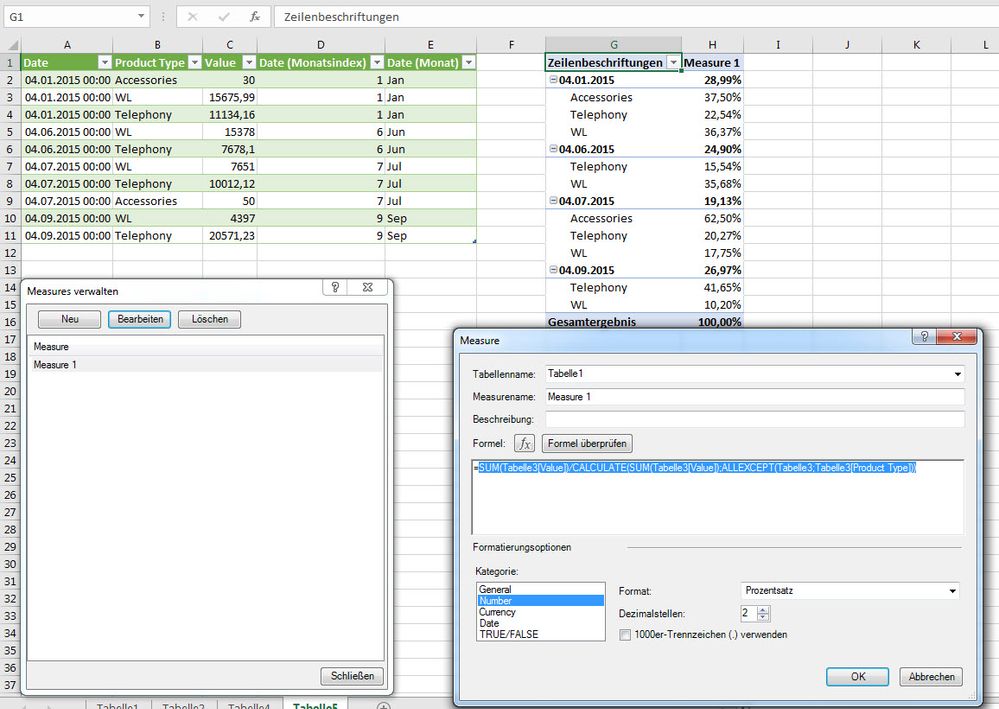
I think this measure would give you your result you wish to have.
Hi, try with this:
%ByDay =
SUMX (
Table1,
DIVIDE (
CALCULATE ( SUM ( Table1[Value] ) ),
CALCULATE ( SUM ( Table1[Value] ), ALLEXCEPT ( Table1,Table1[Product Type] ) )
)
)
Hi, try with this:
%ByDay =
SUMX (
Table1,
DIVIDE (
CALCULATE ( SUM ( Table1[Value] ) ),
CALCULATE ( SUM ( Table1[Value] ), ALLEXCEPT ( Table1,Table1[Product Type] ) )
)
)
Hi Paulompm,
I think this measure would give you your result you wish to have.
actually it isn't working very well this measure. I have data for several years and I think the ALLEXCEPT Is mixing the years or month or both. I should get much higher percentage values.
Check out the April 2026 Power BI update to learn about new features.
Sign up to receive a private message when registration opens and key events begin.
If you have recently started exploring Fabric, we'd love to hear how it's going. Your feedback can help with product improvements.
| User | Count |
|---|---|
| 36 | |
| 28 | |
| 28 | |
| 20 | |
| 18 |
| User | Count |
|---|---|
| 65 | |
| 35 | |
| 33 | |
| 25 | |
| 24 |