Learn from the best! Meet the four finalists headed to the FINALS of the Power BI Dataviz World Championships! Register now
Hi,
I have next matrix in Power BI, where I need to add conditional formatting to value in columns Jan-2010:Jun 2010 based on Start Date and End Date columns. For instance, for the first row the color of 13 and 18 should be red, while 13, 19 14, 10 should be green. How can I approach this problem?
| Item 1 | Item 2 | Start Date | End Date | Jan-2010 | Feb-2010 | Mar-2010 | Apr-2010 | May-2010 | Jun-2010 |
| S2 | ik22 | 01/11/2009 | 01/03/2010 | 13 | 18 | 13 | 19 | 14 | 10 |
| S3 | ik23 | 15/10/2009 | 15/02/2010 | 15 | 20 | 12 | 18 | 11 | 11 |
| S4 | ik24 | 01/12/2009 | 20/04/2010 | 13 | 16 | 20 | 11 | 20 | 10 |
| S5 | ik25 | 15/11/2009 | 15/02/2010 | 20 | 10 | 13 | 12 | 15 | 16 |
| S6 | ik26 | 20/12/2009 | 20/05/2010 | 17 | 18 | 17 | 15 | 16 | 15 |
| S7 | ik27 | 23/02/2009 | 23/08/2010 | 16 | 16 | 13 | 20 | 20 | 19 |
Solved! Go to Solution.
Hi @Anonymous
You can do it by creating Measure like below.
Conditional Formatting =
SUMX(
'Table',
INT (
AND(
'Table'[Date] >= 'Table'[Start Date],
'Table'[Date] <= 'Table'[End Date]
)
)
)
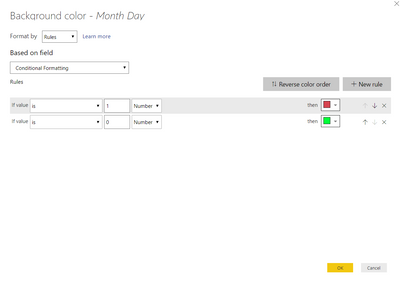
And later using it for Conditional Formating like below.
Hi @Anonymous
You can do it by creating Measure like below.
Conditional Formatting =
SUMX(
'Table',
INT (
AND(
'Table'[Date] >= 'Table'[Start Date],
'Table'[Date] <= 'Table'[End Date]
)
)
)
And later using it for Conditional Formating like below.
| User | Count |
|---|---|
| 57 | |
| 44 | |
| 32 | |
| 16 | |
| 14 |
| User | Count |
|---|---|
| 84 | |
| 69 | |
| 38 | |
| 27 | |
| 25 |