cancel
Showing results for 
Search instead for 
Did you mean: 

The Power BI Data Visualization World Championships is back! Get ahead of the game and start preparing now! Learn more

Reply
Anonymous
Not applicable

Conditional formatting based on two dates

Hi,


I have next matrix in Power BI, where I need to add conditional formatting to value in columns Jan-2010:Jun 2010 based on Start Date and End Date columns. For instance, for the first row the color of 13 and 18 should be red, while 13, 19 14, 10 should be green. How can I approach this problem? 


Item 1Item 2Start DateEnd DateJan-2010Feb-2010Mar-2010Apr-2010May-2010Jun-2010
S2ik2201/11/200901/03/2010131813191410
S3ik2315/10/200915/02/2010152012181111
S4ik2401/12/200920/04/2010131620112010
S5ik2515/11/200915/02/2010201013121516
S6ik2620/12/200920/05/2010171817151615
S7ik2723/02/200923/08/2010161613202019
1 ACCEPTED SOLUTION
Mariusz
Community Champion
Community Champion

Hi @Anonymous 


You can do it by creating Measure like below.

Conditional Formatting = 
SUMX( 
    'Table',
    INT (
        AND( 
            'Table'[Date] >= 'Table'[Start Date],
            'Table'[Date] <= 'Table'[End Date] 
        )
    )
)

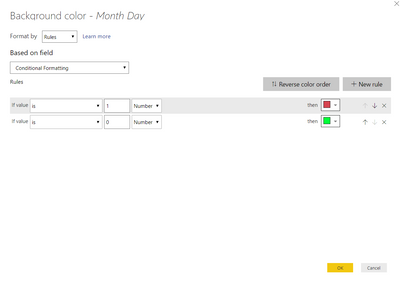
And later using it for Conditional Formating like below.

image.png

This will give you the following result.
image.png
Please see the attached file with the solution.
 
Best Regards,
Mariusz

If this post helps, then please consider Accepting it as the solution.

Please feel free to connect with me.
Mariusz Repczynski


View solution in original post

1 REPLY 1
Mariusz
Community Champion
Community Champion

Hi @Anonymous 


You can do it by creating Measure like below.

Conditional Formatting = 
SUMX( 
    'Table',
    INT (
        AND( 
            'Table'[Date] >= 'Table'[Start Date],
            'Table'[Date] <= 'Table'[End Date] 
        )
    )
)

And later using it for Conditional Formating like below.

image.png

This will give you the following result.
image.png
Please see the attached file with the solution.
 
Best Regards,
Mariusz

If this post helps, then please consider Accepting it as the solution.

Please feel free to connect with me.
Mariusz Repczynski


Helpful resources

Announcements
Power BI DataViz World Championships

Power BI Dataviz World Championships

The Power BI Data Visualization World Championships is back! Get ahead of the game and start preparing now!

December 2025 Power BI Update Carousel

Power BI Monthly Update - December 2025

Check out the December 2025 Power BI Holiday Recap!

FabCon Atlanta 2026 carousel

FabCon Atlanta 2026

Join us at FabCon Atlanta, March 16-20, for the ultimate Fabric, Power BI, AI and SQL community-led event. Save $200 with code FABCOMM.