Get Fabric or SQL Certified for Free.
Get certified for free when you join Fabric Data Days 2026 and dive into Fabric, Power BI, SQL, AI, and other essential data skills.
Join now- Power BI forums
- Get Help with Power BI
- Desktop
- Service
- Report Server
- Power Query
- Mobile Apps
- Developer
- DAX Commands and Tips
- Custom Visuals Development Discussion
- Health and Life Sciences
- Power BI Spanish forums
- Translated Spanish Desktop
- Training and Consulting
- Instructor Led Training
- Dashboard in a Day for Women, by Women
- Galleries
- Data Stories Gallery
- Themes Gallery
- Contests Gallery
- QuickViz Gallery
- Quick Measures Gallery
- Visual Calculations Gallery
- Notebook Gallery
- Translytical Task Flow Gallery
- TMDL Gallery
- R Script Showcase
- Webinars and Video Gallery
- Ideas
- Custom Visuals Ideas (read-only)
- Issues
- Issues
- Events
- Upcoming Events
July 7 - July 17 | Round 2 of the Power BI Dataviz World Championships. Don't miss your chance! Learn more
- Power BI forums
- Forums
- Get Help with Power BI
- Desktop
- (Another) Sort by another column problem
- Subscribe to RSS Feed
- Mark Topic as New
- Mark Topic as Read
- Float this Topic for Current User
- Bookmark
- Subscribe
- Printer Friendly Page

- Mark as New
- Bookmark
- Subscribe
- Mute
- Subscribe to RSS Feed
- Permalink
- Report Inappropriate Content
(Another) Sort by another column problem
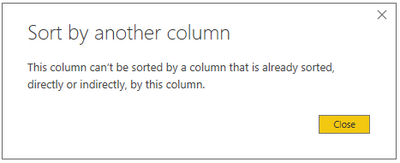
Trying to sort a column in my custom date table (a csv file) via a calculated column in the same table but am seeing an error. The calculated column does not reference the column I wish to sort by. Here's the DAX for the calculated column:
PeriodOffset = (Dates[Period]+(Dates[FiscalYear]*13))-
                (CALCULATE(VALUES(Dates[Period]),
                            Dates[Date]=TODAY())+
                (CALCULATE(VALUES(Dates[FiscalYear]),
                    Dates[Date]=TODAY())*13
                    ))
My date table has every date from 2003/4 to 2034/35, along with custom period numbers, calendar and fiscal years etc. The column I am trying to sort is called PeriodFiscalYear. Each value in that column has only one entry in the PeriodOffset column so it's not that.
Solved! Go to Solution.
- Mark as New
- Bookmark
- Subscribe
- Mute
- Subscribe to RSS Feed
- Permalink
- Report Inappropriate Content
I believe I've solved this problem. It was caused by a relationship between my date table and a fact table. The relationship was between a calculated column in the latter that looked up a value from a column in the former. Power BI allowed it, but it seemed to affect the behaviour of reports built using the dataset.
Removing the relationship means I can perform the sort I need.
To recreate the relationship, I've calculated a table in the query that include only the columns I need and inserted this between to the two tables in my model.
- Mark as New
- Bookmark
- Subscribe
- Mute
- Subscribe to RSS Feed
- Permalink
- Report Inappropriate Content
HI @Anonymous ,
You can also take a look at the following blog about creating a custom sort order table to achieve customer sort order:
Regards,
Xiaoxin Sheng


- Mark as New
- Bookmark
- Subscribe
- Mute
- Subscribe to RSS Feed
- Permalink
- Report Inappropriate Content
@Anonymous -
What is the error you received?
Did I answer your question? Mark my post as a solution!
Did my answers help arrive at a solution? Give it a kudos by clicking the Thumbs Up!
Proud to be a Super User!
- Mark as New
- Bookmark
- Subscribe
- Mute
- Subscribe to RSS Feed
- Permalink
- Report Inappropriate Content
- Mark as New
- Bookmark
- Subscribe
- Mute
- Subscribe to RSS Feed
- Permalink
- Report Inappropriate Content
@Anonymous -
You've identified this table as a 'Mark as Date Table' correct? Can you provide a sample?
Did I answer your question? Mark my post as a solution!
Did my answers help arrive at a solution? Give it a kudos by clicking the Thumbs Up!
Proud to be a Super User!
- Mark as New
- Bookmark
- Subscribe
- Mute
- Subscribe to RSS Feed
- Permalink
- Report Inappropriate Content
No, I haven't marked it as a date table. I don't need to use the time intelligence fucntions as my calendar has custom periods. I'd be happy to provide the csv but I don't have anywhere I can upload it that I can access as work.
- Mark as New
- Bookmark
- Subscribe
- Mute
- Subscribe to RSS Feed
- Permalink
- Report Inappropriate Content
@Anonymous -
Are they not custom periods based off of sequential dates? Those dates become the sort order. Time Intelligence functions do not need to be utilized just by marking as a date table.
I built a custom period calendar table, marked as date table, and have had no issues with sorting. Possibly it is just the implementation you've chosen that is causing intermittent successes.
Did I answer your question? Mark my post as a solution!
Did my answers help arrive at a solution? Give it a kudos by clicking the Thumbs Up!
Proud to be a Super User!
- Mark as New
- Bookmark
- Subscribe
- Mute
- Subscribe to RSS Feed
- Permalink
- Report Inappropriate Content
Are they not custom periods based off of sequential dates?
Yes, but the periods change slightly each financial year. For example, 29th April can be in Period 1 or Period 2. The logic for this is implemented.
Those dates become the sort order. Time Intelligence functions do not need to be utilized just by marking as a date table.
I wish to sort by Period/Fiscal Year for visuals. If I don't do this, the x-axis of a chart showing the last 13 periods of data would put period 13, 2018/19 after period 1, 2019/20. Hope that makes sense.
I can certainly try marking it as a date table, I'm just not sure why this would matter!
- Mark as New
- Bookmark
- Subscribe
- Mute
- Subscribe to RSS Feed
- Permalink
- Report Inappropriate Content
@Anonymous -
Maybe take a look at how I implemented my custom periods at http://cjmendoza.yourweb.csuchico.edu/custom-calendar/create-a-custom-period-calendar-in-power-query.... Seems like your need is similar.
Did I answer your question? Mark my post as a solution!
Did my answers help arrive at a solution? Give it a kudos by clicking the Thumbs Up!
Proud to be a Super User!
- Mark as New
- Bookmark
- Subscribe
- Mute
- Subscribe to RSS Feed
- Permalink
- Report Inappropriate Content
I've had a look at your post. Very similar to what I've done, except I did it in Excel then imported into Power BI. I think my PeriodOffset column is similar to your index column, except mine is dynamic; i.e. it's recalculated everytime the model is loaded. This means in time intelligence functions, I don't have to find the current period number each time: I know it's PeriodOffset = 0.
I'm still confused as to why my method is not sortable. Perhaps the way I am doing it isn't the best. I did try generating the column within the query, but I couldn't get the list functions to accept a table column as an argument.
- Mark as New
- Bookmark
- Subscribe
- Mute
- Subscribe to RSS Feed
- Permalink
- Report Inappropriate Content
@Anonymous -
I would be interested in seeing your file. Hope you find your solution, best of luck.
Did I answer your question? Mark my post as a solution!
Did my answers help arrive at a solution? Give it a kudos by clicking the Thumbs Up!
Proud to be a Super User!
- Mark as New
- Bookmark
- Subscribe
- Mute
- Subscribe to RSS Feed
- Permalink
- Report Inappropriate Content
I believe I've solved this problem. It was caused by a relationship between my date table and a fact table. The relationship was between a calculated column in the latter that looked up a value from a column in the former. Power BI allowed it, but it seemed to affect the behaviour of reports built using the dataset.
Removing the relationship means I can perform the sort I need.
To recreate the relationship, I've calculated a table in the query that include only the columns I need and inserted this between to the two tables in my model.
- Mark as New
- Bookmark
- Subscribe
- Mute
- Subscribe to RSS Feed
- Permalink
- Report Inappropriate Content
Cheers Chris, I will. I'm off home now (in the UK) but will post back tomorrow.
Helpful resources

FabCon & SQLCon – Barcelona 2026
Join us in Barcelona for FabCon and SQLCon, the Fabric, Power BI, SQL, and AI community event. Save €200 with code FABCMTY200.

Data Days 2026
Join Data Days 2026: 60 days of free live/on-demand sessions, challenges, study groups, and certification opportunities.

Power BI DataViz World Championships - June 2026
A new Power BI DataViz World Championship is coming this June! Don't miss out on submitting your entry.

| User | Count |
|---|---|
| 29 | |
| 27 | |
| 24 | |
| 24 | |
| 18 |


| User | Count |
|---|---|
| 54 | |
| 50 | |
| 41 | |
| 33 | |
| 29 |


