cancel
Showing results for 
Search instead for 
Did you mean: 

The Fabric community is upgrading! Read all of the details including the timeline and what you can expect. Learn more

Reply
JimJim
Responsive Resident
Responsive Resident

Conditional formatting based on another value

Hello,

I have the following measure:


Total SA WIP > 2 days = 
    CALCULATE(COUNTROWS('Service Appointment'),
        'Service Appointment'[IsWIP]=1,
        'Service Appointment'[WIP Days] >2)


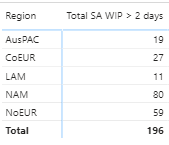
Which looks like this when added to my matrix:


Screenshot 2020-11-11 144648.png

I have a requirement to apply conditional formatting, but, the rag threshold will change depending on the Region. 

For all regions except NAM, the rag groups will be '> 50' (red), '10 - 50' (amber) and '< 10' (green)

For NAM, the rag groups will be '> 150' (red), '30 - 150' (amber) and '< 30' (green)

How can I achieve this?

1 ACCEPTED SOLUTION
amitchandak
Super User
Super User

@JimJim , Create a color measure as the given example and use it in conditional format with the field value option

Color?
switch ( true(),
FIRSTNONBLANK('Table'[commodity],"NA") á"commodity1" && sum('Table'[Value]) >500,"lightgreen",
FIRSTNONBLANK('Table'[commodity],"NA") á"commodity2" && sum('Table'[Value]) >1000,"lightgreen",
Add more conditions
"Nice stay"
)

reference: https://radacad.com/dax-and-conditional-formatting-better-together-find-the-biggest-and-smallest-num...
https://docs.microsoft.com/en-us/power-bi/desktop-conditional-table-formatting#color-by-color-values

Share with Power BI Enthusiasts: Full Power BI Video (20 Hours) YouTube
Microsoft Fabric Series 60+ Videos YouTube
Microsoft Fabric Hindi End to End YouTube

View solution in original post

3 REPLIES 3
JimJim
Responsive Resident
Responsive Resident

Just in case anyone is interested, here is the finished measure:

Colour = 
IF (
    FIRSTNONBLANK ( Location[Region], "NA" ) = "NAM",
    SWITCH (
        TRUE (),
        'Key Measures'[Total SA WIP > 2 days] < 30, "lightgreen",
        'Key Measures'[Total SA WIP > 2 days] <= 150, "orange",
        "red"
    ),
    SWITCH (
        TRUE (),
        'Key Measures'[Total SA WIP > 2 days] < 10, "lightgreen",
        'Key Measures'[Total SA WIP > 2 days] <= 50, "orange",
        "red"
    )
)
amitchandak
Super User
Super User

@JimJim , Create a color measure as the given example and use it in conditional format with the field value option

Color?
switch ( true(),
FIRSTNONBLANK('Table'[commodity],"NA") á"commodity1" && sum('Table'[Value]) >500,"lightgreen",
FIRSTNONBLANK('Table'[commodity],"NA") á"commodity2" && sum('Table'[Value]) >1000,"lightgreen",
Add more conditions
"Nice stay"
)

reference: https://radacad.com/dax-and-conditional-formatting-better-together-find-the-biggest-and-smallest-num...
https://docs.microsoft.com/en-us/power-bi/desktop-conditional-table-formatting#color-by-color-values

Share with Power BI Enthusiasts: Full Power BI Video (20 Hours) YouTube
Microsoft Fabric Series 60+ Videos YouTube
Microsoft Fabric Hindi End to End YouTube

Amazing, thank you @amitchandak 

Helpful resources

Announcements
FabCon and SQLCon Barcelona 2026

FabCon & SQLCon – Barcelona 2026

Join us in Barcelona for FabCon and SQLCon, the Fabric, Power BI, SQL, and AI community event. Save €200 with code FABCMTY200.

Power BI DataViz World Championships carousel

Power BI DataViz World Championships - June 2026

A new Power BI DataViz World Championship is coming this June! Don't miss out on submitting your entry.