Don't miss your chance to take the Fabric Data Engineer (DP-600) exam for FREE! Find out how by attending the DP-600 session on April 23rd (pacific time), live or on-demand.
Learn moreJoin the FabCon + SQLCon recap series. Up next: Power BI, Real-Time Intelligence, IQ and AI, and Data Factory take center stage. All sessions are available on-demand after the live show. Register now
Hello,
I have the following measure:
Total SA WIP > 2 days =
CALCULATE(COUNTROWS('Service Appointment'),
'Service Appointment'[IsWIP]=1,
'Service Appointment'[WIP Days] >2)
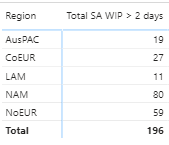
Which looks like this when added to my matrix:
I have a requirement to apply conditional formatting, but, the rag threshold will change depending on the Region.
For all regions except NAM, the rag groups will be '> 50' (red), '10 - 50' (amber) and '< 10' (green)
For NAM, the rag groups will be '> 150' (red), '30 - 150' (amber) and '< 30' (green)
How can I achieve this?
Solved! Go to Solution.
@JimJim , Create a color measure as the given example and use it in conditional format with the field value option
Color?
switch ( true(),
FIRSTNONBLANK('Table'[commodity],"NA") á"commodity1" && sum('Table'[Value]) >500,"lightgreen",
FIRSTNONBLANK('Table'[commodity],"NA") á"commodity2" && sum('Table'[Value]) >1000,"lightgreen",
Add more conditions
"Nice stay"
)
reference: https://radacad.com/dax-and-conditional-formatting-better-together-find-the-biggest-and-smallest-num...
https://docs.microsoft.com/en-us/power-bi/desktop-conditional-table-formatting#color-by-color-values
Just in case anyone is interested, here is the finished measure:
Colour =
IF (
FIRSTNONBLANK ( Location[Region], "NA" ) = "NAM",
SWITCH (
TRUE (),
'Key Measures'[Total SA WIP > 2 days] < 30, "lightgreen",
'Key Measures'[Total SA WIP > 2 days] <= 150, "orange",
"red"
),
SWITCH (
TRUE (),
'Key Measures'[Total SA WIP > 2 days] < 10, "lightgreen",
'Key Measures'[Total SA WIP > 2 days] <= 50, "orange",
"red"
)
)
@JimJim , Create a color measure as the given example and use it in conditional format with the field value option
Color?
switch ( true(),
FIRSTNONBLANK('Table'[commodity],"NA") á"commodity1" && sum('Table'[Value]) >500,"lightgreen",
FIRSTNONBLANK('Table'[commodity],"NA") á"commodity2" && sum('Table'[Value]) >1000,"lightgreen",
Add more conditions
"Nice stay"
)
reference: https://radacad.com/dax-and-conditional-formatting-better-together-find-the-biggest-and-smallest-num...
https://docs.microsoft.com/en-us/power-bi/desktop-conditional-table-formatting#color-by-color-values
Check out the April 2026 Power BI update to learn about new features.
If you have recently started exploring Fabric, we'd love to hear how it's going. Your feedback can help with product improvements.
A new Power BI DataViz World Championship is coming this June! Don't miss out on submitting your entry.
| User | Count |
|---|---|
| 48 | |
| 46 | |
| 41 | |
| 20 | |
| 17 |
| User | Count |
|---|---|
| 69 | |
| 67 | |
| 32 | |
| 27 | |
| 26 |